12 Best AI Writing Tools in 2026 — With the Real Free Limits
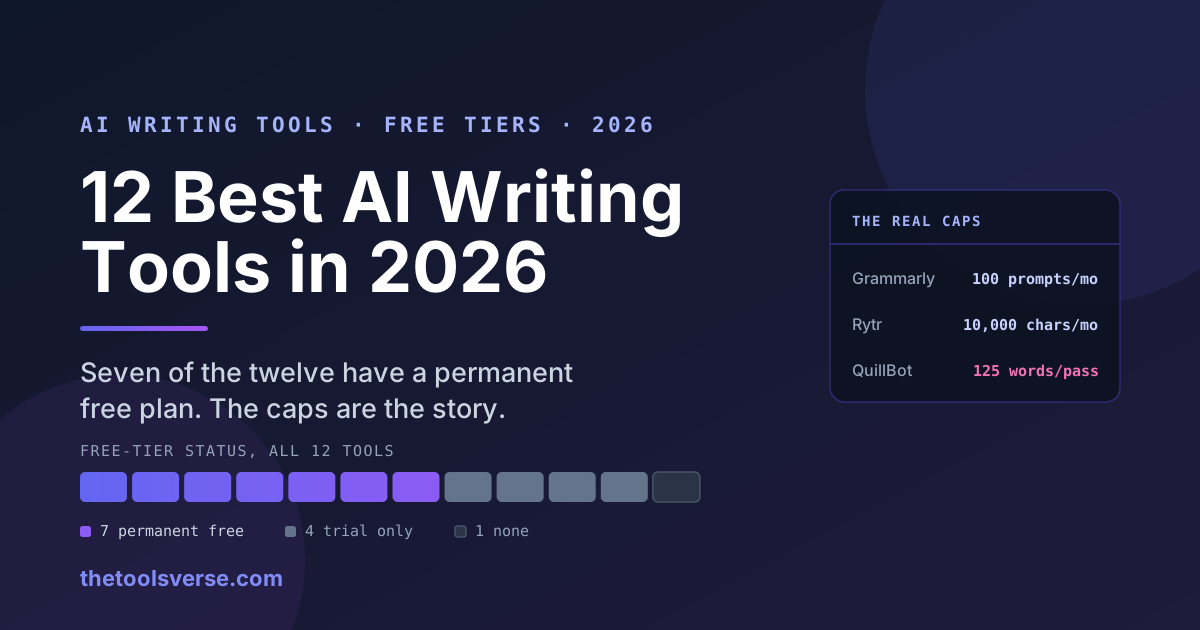
Most "best AI writing tools" lists tell you a tool has a free plan. Almost none tell you what that free plan actually gives you before it stops.
That is the gap this list exists to close. Every tool below is listed with the exact limit on its free tier — the number of prompts, words, characters or credits — rather than the word "free" doing all the work. Where we checked the figure against the vendor's own pricing page ourselves, the date is on it.
The short answer
- Best free all-rounder: ChatGPT — a genuinely permanent free plan, capped by daily message limits that tighten at peak times.
- Best for correctness everywhere you write: Grammarly — but the free plan is 100 AI prompts a month, and rewrites are Pro-only.
- Best for long-form quality: Claude — the strongest free tier for sustained, coherent long-form prose.
- Best for fiction: Sudowrite — the only tool here built for novels rather than marketing copy. No free plan, trial only.
- Best for rewriting and paraphrasing: QuillBot — real free plan, capped at 125 words per paraphrase.
- Best for marketing teams: Jasper — brand-voice training, but $39/month and no free tier.
- Cheapest paid unlimited: Rytr — $9/month after a 10,000-character free plan.
If you only want tools that are free permanently, skip the paid picks and use our verified free AI tools list, where every listing carries its free-tier catch.
Comparison: what each free tier actually gives you
| Tool | Best for | Free tier — the real limit | Paid from | Figure last checked |
|---|---|---|---|---|
| ChatGPT | Free all-rounder | Yes — permanent free plan, daily message caps that tighten at peak times | $20/mo Plus | Listing data |
| Claude | Long-form quality | Yes — free access to Sonnet with daily usage limits | $20/mo Pro | Listing data |
| Grammarly | Correctness everywhere | Yes — 100 AI prompts/month; grammar and tone unlimited | $12/mo Pro | 19 Aug 2026 |
| QuillBot | Rewriting, paraphrasing | Yes — 125 words per paraphrase | $4.17/mo annual | Listing data |
| HyperWrite | Free browser extension | Yes — free extension | See vendor | Listing data |
| Hemingway Editor | Readability editing | Yes — free web app | $19.99 one-time desktop | Listing data |
| Rytr | Cheapest unlimited | Yes — 10,000 characters/month | $9/mo unlimited | Listing data |
| WriteSonic | SEO content on a budget | Trial only — 10,000 words | $16/mo (133k words) | Listing data |
| Notion AI | If you already use Notion | Trial only — roughly 20 AI responses | $20/user/mo annual | Listing data |
| Jasper | Marketing teams, brand voice | No free plan — 7-day trial | $39/mo Creator (annual) | Listing data |
| Copy.ai | Marketing copy at scale | No free plan | $49/mo Pro | Listing data |
| Sudowrite | Fiction and novels | No free plan — trial only, no card required | $10/mo Hobby (225k credits) | 19 Aug 2026 |
Read the fourth column, not the third
Six of the twelve tools here are commonly described online as "free". Only seven have a permanent free plan, and of those, most are capped in a way that matters within a single afternoon of real work — Grammarly at 100 AI prompts a month, Rytr at 10,000 characters, QuillBot at 125 words per pass. "Has a free tier" and "is usable for free" are different claims.
The tools, in order of what they are best at
1. ChatGPT — best free all-rounder
The default answer for most people, and it earns it: the free plan is permanent rather than a trial, and it handles drafting, rewriting, summarising and outlining competently across almost any format.
The constraint is throughput. Free usage is governed by daily message caps that tighten when demand is high, so the tool is least available exactly when most people want it — weekday working hours.
Pros & Cons
Pros
- +Permanent free plan, not a trial — no card, no expiry
- +Handles nearly every writing task competently rather than specialising
- +Fastest path from blank page to usable first draft
Cons
- −Daily caps tighten at peak times, which is when you are most likely to be working
- −Voice flattens over long documents without heavy prompting
- −No built-in grammar layer for the apps you actually write in
Full breakdown on our ChatGPT listing.
2. Claude — best for long-form quality
Where ChatGPT is the better generalist, Claude holds a consistent voice further into a long document, which matters if you are drafting anything past about a thousand words. The free tier gives access to Sonnet with daily usage limits.
For book-length work it still drifts — that is what Sudowrite exists to solve — but for essays, reports and long articles it produces the least "AI-shaped" prose of the general assistants here.
See the Claude listing for current limits.
3. Grammarly — best for correctness everywhere you write
Grammarly is the only tool on this list that works inside the places you already write — browser, Word, Google Docs, Gmail, Slack — rather than asking you to move into a new editor. For anyone whose writing is mostly email and documents, that placement is worth more than raw generation quality.
But the free plan is narrower than the brand's reputation suggests. We checked the plans page on 19 August 2026: free covers spelling, grammar and tone detection plus 100 generative AI prompts a month. Tone adjustment, full-sentence rewrites, fluency help, citation consistency, plagiarism detection and AI-text detection are all Pro, at $12/month. Pro raises the prompt allowance to 2,000 per member per month — a twentyfold difference, and the real reason people upgrade.
Grammarly — Pros & Cons
Pros
- +Works inside existing apps rather than as a separate editor
- +Free tier is genuinely useful for correctness alone, no card required
- +Tone detection catches how a message will land before you send it
Cons
- −100 AI prompts/month on free — a single drafting session can exhaust it
- −Rewrites, plagiarism and AI detection are all paywalled
- −A corrector first and a writer second — weak at long-form generation
Full pricing breakdown on the Grammarly listing.
4. Sudowrite — best for fiction
The only tool here built for novels rather than marketing copy. Its Story Bible holds characters, plot and world details so voice stays consistent across a manuscript — the exact failure mode that makes general assistants frustrating for fiction.
Checked 19 August 2026: there is no permanent free tier. Every plan starts with a free trial that needs no credit card, then Hobby & Student is $10/month for 225,000 credits, Professional $22/month for 450,000 with rollover, and Max $44/month for 2,000,000 with rollover for up to 12 months. Cancel and you keep your projects but lose all AI features.
If you are choosing between fiction tools specifically, our NovelAI vs Sudowrite comparison covers that decision in more detail.
5. QuillBot — best for rewriting and paraphrasing
Narrow and good at its one job. The free plan is real, and its limit is a hard 125 words per paraphrase — about one paragraph. That is a genuine constraint on long documents and almost none on the sentence-level rewriting most people actually want it for. We have not verified whether a daily cap sits on top of the word cap.
See the QuillBot listing, or the AI Humanizer specifically.
6. Jasper — best for marketing teams
Built for teams producing volume, not for individuals. The Knowledge Graph trains on company terminology so multiple writers produce consistent brand voice, and Pro adds SurferSEO scoring inside the editor.
There is no free plan — a 7-day trial, then $39/month Creator or $59/month Pro, both billed annually. That price only makes sense with the team features behind it. For a solo writer it is poor value against Rytr or ChatGPT.
Details on the Jasper listing.
7. Copy.ai — marketing copy at scale
Strong at short-form marketing output — ads, product descriptions, email sequences. Pro is $49/month with unlimited words and there is no free plan, which makes it a harder first purchase than WriteSonic for the same job.
See the Copy.ai listing.
8. WriteSonic — SEO content on a budget
The cheapest credible route into SEO-oriented long-form. The free allowance is a 10,000-word trial rather than a permanent tier, and Pro is $16/month for 133,000 words with SEO tooling included. If your goal is ranking articles rather than prose quality, start here before Jasper.
If SEO is the actual job, our best AI SEO tools guide covers the dedicated options.
9. Rytr — cheapest unlimited
A free plan of 10,000 characters a month — roughly 1,500 words, so genuinely a sampler — then $9/month for unlimited. That is the lowest price for uncapped output on this list, and for straightforward copywriting the quality gap against tools costing four times more is smaller than the pricing implies.
See the Rytr listing.
10. Notion AI — best if you already live in Notion
Only worth evaluating if your writing already happens in Notion. Free and Plus plans include a limited AI trial of roughly 20 responses; sustained use requires the Business plan at $20 per user per month annually. As a standalone writing purchase it is expensive; as an addition to an existing Notion workspace it is convenient.
See the Notion AI listing.
11. Hemingway Editor — best for editing what you already wrote
Not a generator. It grades readability, flags passive voice and marks sentences that run too long. The free web app covers the core function, with a one-time $19.99 desktop version. The most useful tool here for people whose problem is that their writing is dense rather than that it does not exist.
See the Hemingway Editor listing.
12. HyperWrite — best free browser extension
A free browser extension that offers suggestions and completions across the web. Worth installing alongside a primary tool rather than instead of one.
See the HyperWrite listing.
How to choose in one minute
- You write email and documents all day → Grammarly free, upgrade only if you hit the 100-prompt cap.
- You want one tool for everything and will not pay → ChatGPT.
- You are drafting something long → Claude.
- You are writing a novel → Sudowrite, after the trial.
- You need to rephrase, not generate → QuillBot.
- You are a team producing content at volume → Jasper.
- You want unlimited output cheaply → Rytr at $9/month.
- You want only genuinely free tools → our verified free AI tools list.
Students choosing tools for coursework should also read our best AI tools for students guide, which covers the academic-integrity side this page does not.
Frequently Asked Questions
What is the best free AI writing tool?
Are AI writing tools actually free?
What is the best AI for writing a book?
What is the best AI for writing essays?
Do I need a paid AI writing tool?
Which AI writing tool is best for SEO content?
How we put this list together
This is desk research, not a product test. We have not created paid accounts on all twelve tools and run controlled writing tasks through them, and we do not claim to have.
What we do instead is record the number. Every free-tier figure above comes either from a check we ran against the vendor's own public pricing page — with the date shown in the table — or from our own tool listing data, marked as such so you can tell the difference. Two figures on this page, Grammarly and Sudowrite, were read directly from the vendors' pricing pages on 19 August 2026. The remaining ten are listing data awaiting a dated re-check, and we would rather say that than imply a verification we have not done.
Prices are the USD figures shown to a logged-out visitor. Regional pricing, promotional offers and free-tier limits all change without notice — that is exactly why the dates matter, and why a figure without one is worth less than it looks.
Our full method is on how we review. Every free tier we have verified, with its specific catch, is on our free AI tools list.
Some links may be affiliate links. We may earn a small commission at no extra cost to you.
Related Articles
Explore more guides and reviews from our experts.