Flowcharts in Miro (2026): We Built One With AI, and It Wrote Mermaid Code

Short answer: Miro is a fast way to make a flowchart, especially with AI. Its Diagram format lets you start from shapes, a template or code. We asked Miro's AI for a customer-cancellation flowchart, and in about a minute it drew a correct flow: a start point, three decision diamonds, two offers and two endings. Behind the shapes, it had written the whole thing as Mermaid code, which stays linked to the diagram, so you can edit the flow in code or on the board. On the Free plan, two of the twelve diagram templates were available; the rest needed an upgrade. One thing to watch: the finished diagram overlapped other content on our board, and the AI warned it hadn't checked the layout.
We tested on 23 November 2026, on Miro's Free plan, in Chrome on Windows 11. The flowchart describes Brewly, a made-up coffee subscription startup.
Three ways to start a flowchart
Add a Diagram from the "Formats and Flows" menu, open it, and Miro offers three starting points:
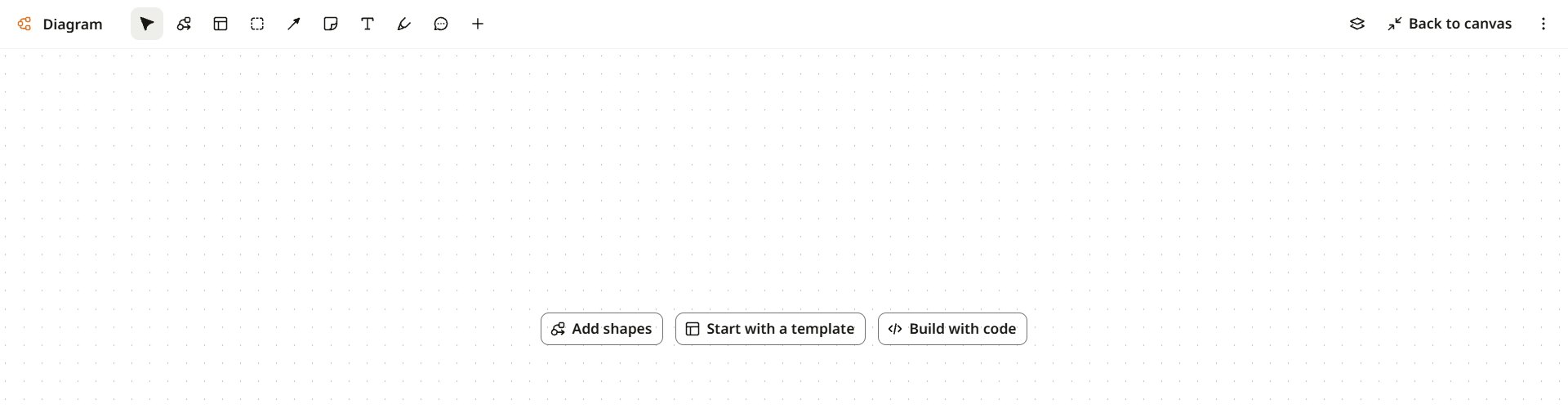
- Add shapes: drag rectangles, diamonds and connectors in yourself.
- Start with a template: pick a ready-made diagram layout.
- Build with code: paste or write Mermaid. We tested that route in detail in our Mermaid test.
Which templates are free
The template list shows straight away what the Free plan includes:
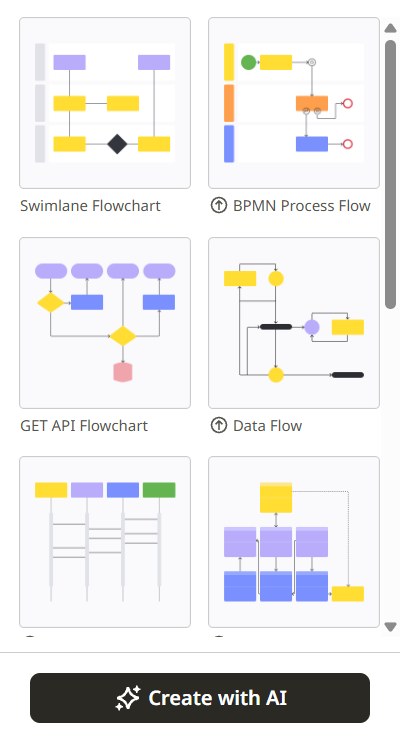
| Available on Free | Marked "Upgrade" on Free |
|---|---|
| Swimlane Flowchart, GET API Flowchart | BPMN Process Flow, Data Flow, Login UML Sequence, UML Class Diagram, ERD for CRM, AWS Cloud, Azure Data Flow, Google Cloud, Kubernetes Architecture, Cisco Data Network |
So for everyday flowcharts the Free plan is fine; for formal notations such as BPMN and UML, or cloud architecture diagrams, you need a paid plan. At the bottom of the list is Create with AI, which is what we tested.
Our test: a cancellation flowchart from one prompt
"Create with AI" opens Sidekick inside the diagram. We described the process in plain English:
In this diagram, draw a flowchart of what happens when a Brewly subscriber clicks Cancel. Brewly is a made-up coffee subscription. Steps: ask the reason; if they want a break, offer to skip a month; if price is the reason, offer 20% off the next box; if they accept an offer, keep the subscription; otherwise cancel and schedule a win-back email after 30 days. Use decision diamonds.
About a minute later Sidekick replied that it had drawn "the Brewly cancel flowchart", named the diagram "Brewly cancel flow", and walked through each step in the chat. It also said, as it did in our other tests, "I haven't checked how the diagram looks on the board."
The result
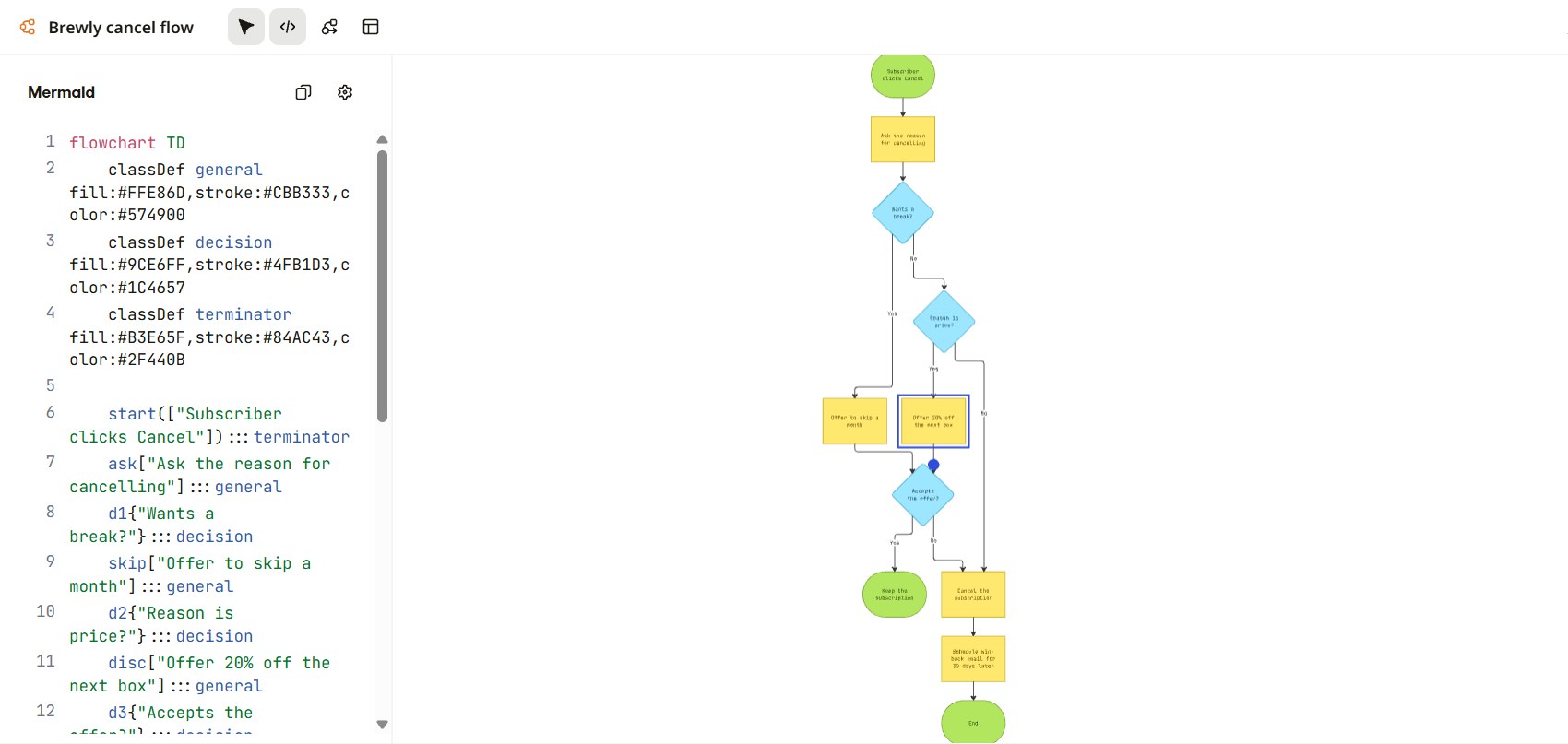
Opened full-size, the diagram shows the flow on the right and, on the left, the Mermaid code Sidekick wrote to produce it:
We checked the logic against our prompt:
- Start: "Subscriber clicks Cancel", then "Ask the reason for cancelling".
- Decision 1, "Wants a break?": yes leads to "Offer to skip a month"; no leads to the price question.
- Decision 2, "Reason is price?": yes leads to "Offer 20% off the next box"; no goes straight to cancelling.
- Decision 3, "Accepts the offer?": both offers lead here. Yes ends at "Keep the subscription"; no leads to "Cancel the subscription", then "Schedule win-back email for 30 days later", then End.
Every branch was correct, and each yes and no line was labelled. Sidekick also chose sensible colours by itself: green for start and end, yellow for steps, blue for decisions. The code shows them as three reusable styles, general, decision and terminator.
Why the code matters: because the flowchart is Mermaid underneath, it isn't a dead picture. In our Mermaid test we confirmed that, for flowcharts, editing a shape on the board updates the code and editing the code updates the board. You can also copy the code into documentation or a code repository.
One thing to watch: layout
The diagram's frame grew upwards when the flowchart was drawn, and ended up overlapping the mind map already on our board:
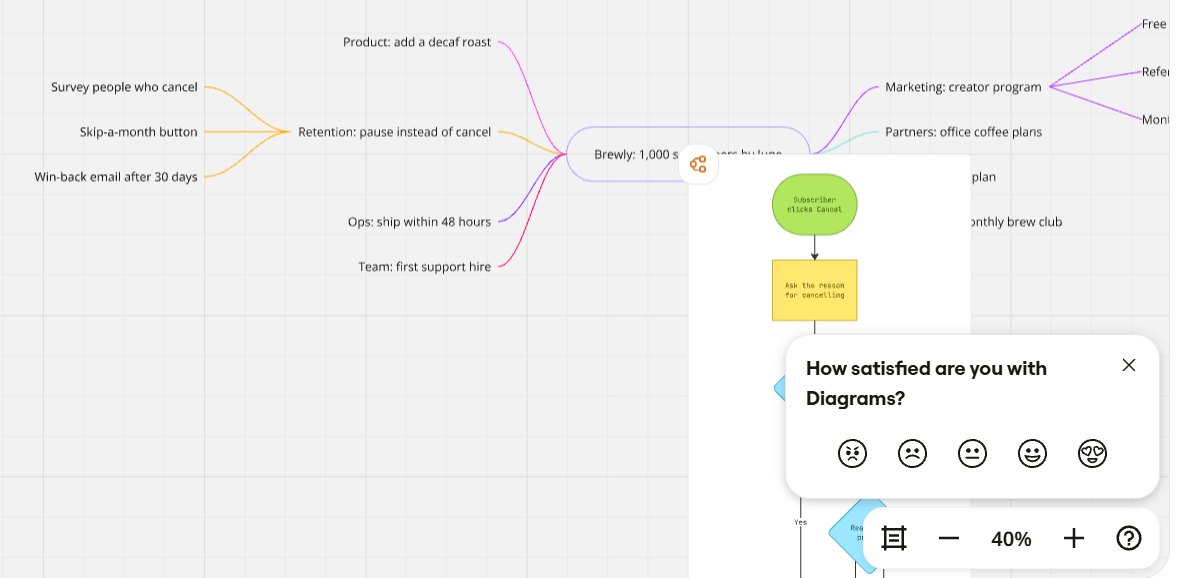
Nothing was lost. Drag the diagram somewhere clear and it's fine. But on a busy board, check where AI output lands. Miro also showed a satisfaction survey after the diagram was created; it can be closed.
Miro vs Lucidchart for flowcharts
We didn't test Lucidchart for this article. Here is how the two compare on published facts, read on each vendor's own pricing page on 23 November 2026:
| Miro | Lucidchart | |
|---|---|---|
| Free plan | 3 editable boards | 3 editable documents, 75 shapes per document |
| Entry paid plan | Starter: $8 per member a month, billed yearly | Individual: $9 a month, billed annually |
| Team plan | Business: $20 per member a month, billed yearly | Team: $10 per user a month, billed annually |
| What it's built around | A shared canvas: flowcharts next to brainstorms, docs, timelines and Kanban | Structured diagramming, with data linking and Visio import on paid plans |
| AI flowcharts | Tested by us: drawn from a prompt, as editable Mermaid | Lucid AI included on Free, according to Lucid's pricing page |
How to choose: if the flowchart is the deliverable and you need formal notations or Visio files, Lucidchart is built for that. If the flowchart is one part of a team's planning, next to the research, the mind map and the sprint board, Miro keeps it all on one canvas. See our listings for Miro and Lucidchart.
Verdict
Miro's AI turned a plain-English description into a correct, well-labelled flowchart in about a minute, and wrote it as Mermaid code you can keep editing on the board or in code. That's the quickest route we've found from a process in someone's head to a diagram a team can discuss. Check where the diagram lands on a busy board, and expect to upgrade for BPMN, UML or cloud diagrams.
Make a flowchart in Miro for freeRelated
- Docs, Slides and Tables in Miro, tested
- Mermaid diagrams in Miro, tested
- Miro's Intelligent Canvas and Sidekick, tested
- Miro Flows: AI workflows that turn notes into tasks
- Our full Miro review and pricing
Article by Sohail Akhtar, Founder of TheToolsVerse. Tested on 23 November 2026 on Miro's Free plan, in Chrome on Windows 11, using a made-up startup. Claude, the AI assistant we use at TheToolsVerse, ran the test in a browser on our Miro account; the screenshots come from that session. We did not test Lucidchart; its details come from its pricing page, read the same day.
Disclosure: TheToolsVerse is a Miro affiliate and partner. We earn a commission if you subscribe through our links, and Miro may pay us for content. Miro did not review or edit this article. How paid placements work.
Some links may be affiliate links. We may earn a small commission at no extra cost to you.
Related Articles
Explore more guides and reviews from our experts.