Mermaid Diagrams in Miro (2026): We Tested Paste, Visual Editing and the Code Round-Trip
Short answer: Structured Diagrams with Mermaid is worth using if your team already writes diagrams as code. Paste Mermaid onto a Miro board and it becomes native, editable Miro shapes rather than a picture, and it's free on every plan. Flowcharts edit both ways: change a box on the board and the code changes with it.
Two things to know before you rely on it:
- Only flowcharts can be edited visually so far. Sequence, class, ER and state diagrams render as native shapes, but you edit them in code.
- On Windows, check the code after you paste. In our test, pasted code carried hidden line endings. Miro flagged errors, and one sequence diagram quietly dropped its final step until we entered the same code another way.
We tested this on 17 November 2026, on Miro's Free plan, in Chrome on Windows 11. Miro's own help page is the source for anything we didn't test ourselves, and we say so where that applies.
What we tested, and how
We used Claude to write Mermaid for four diagrams of a made-up online course platform, the kind of system a small engineering team documents:
- A flowchart of how a course goes from draft to published, with two review loops.
- A sequence diagram of checkout, with a branch for paid and pending payments.
- An ER diagram of instructors, courses, lessons, students and enrolments.
Then we put each one on a fresh Miro board in three different ways, and tried editing them on the board and in the code.
The diagrams describe a sample app, not a real system. Claude, the AI assistant we use at TheToolsVerse, wrote the Mermaid and ran the test in a browser on our Miro account. The screenshots come from that session.
How Mermaid in Miro works
Miro calls the feature Structured Diagrams with Mermaid. You write Mermaid, the text-based diagram language many developers already use in docs and pull requests, and Miro draws it with its own shapes and connectors, laid out automatically.
According to Miro's help page, you can add a diagram four ways:
- Paste Mermaid code onto a board.
- Drag and drop a
.mmdor.mermaidfile. - Use Formats → Diagram → Build with code and paste into the code panel.
- Ask an AI agent connected to Miro's MCP server, such as Claude Code or Cursor, to create the diagram on a board. Agents can also read a diagram back and update it in place.
Miro says it supports the shapes from Mermaid versions 10 and 11. The feature is available on every plan, Free, Starter, Business, Enterprise and Education, in the browser and the desktop app.
Test 1: paste a flowchart
We copied the flowchart's code and pressed Ctrl+V on an empty board. The diagram appeared in a second or two, built from real Miro shapes: rectangles, diamonds for the two decisions and a circle at the end.
It also arrived with a warning: "This diagram's code has errors, so some parts may be missing."
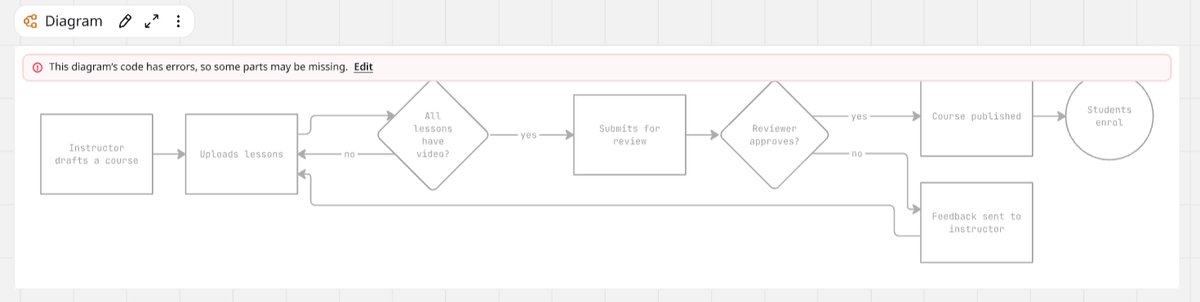
The code was valid Mermaid, so we opened the code panel. Every line had a warning triangle, and there was a small red mark at the end of the first line.
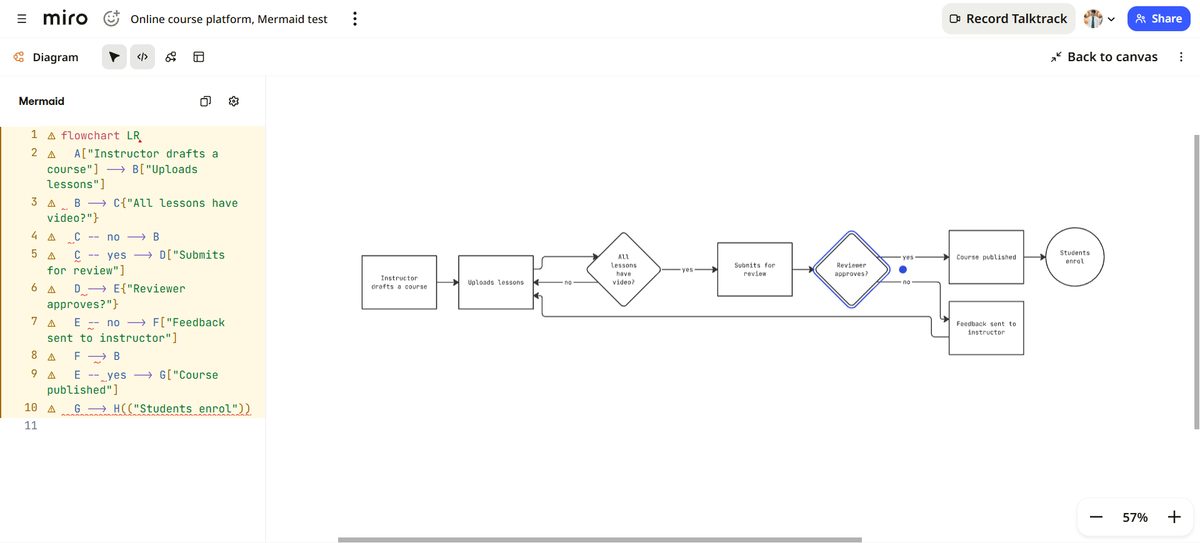
The cause was the clipboard, not the code. On Windows, copying text turns each line break into a carriage return plus a line feed. We confirmed that in the browser: the text we copied came back from the clipboard with the extra character on every line. Miro's code editor treats that character as an error.
We entered the identical code into the code panel without the extra characters, and every warning disappeared, with no change to the diagram.
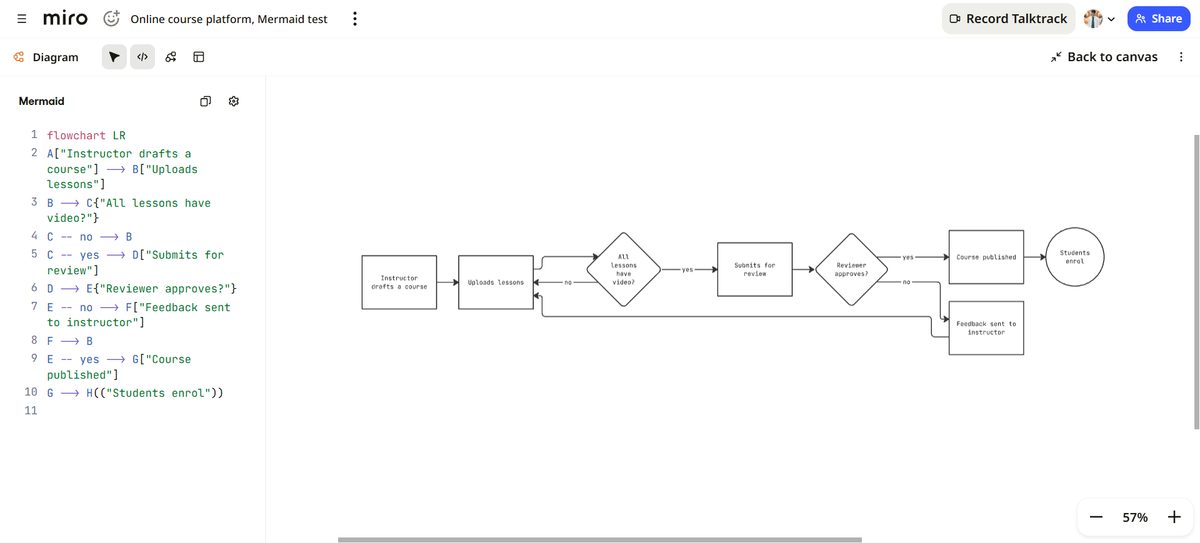
For this flowchart, nothing was actually missing: every box and arrow had rendered despite the warning. The next diagram was different.
Test 2: a sequence diagram lost a step
Our checkout sequence ends with an alt block: if the payment is confirmed, send a receipt and enrol the student; if it's pending, notify support. That branch is the whole point of the diagram.
Pasted on Windows, the branch was gone. The diagram showed every message up to "Status and amount", and nothing ever reached the "Email service" column.
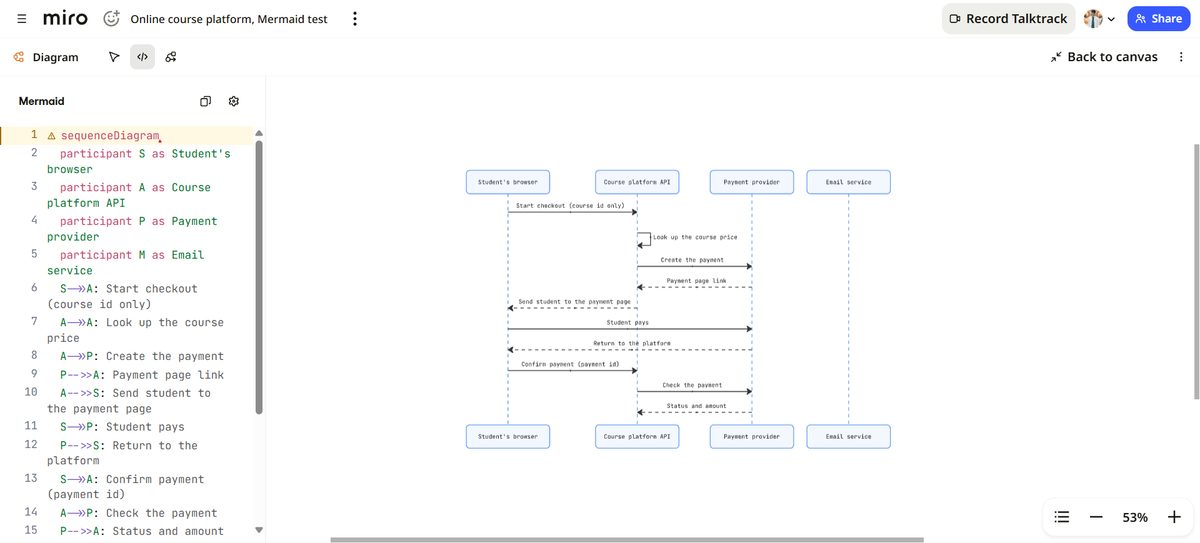
After we re-entered the same code without the hidden characters, the "Alternative" block appeared, with the receipt in the paid branch and the support notice in the pending branch.
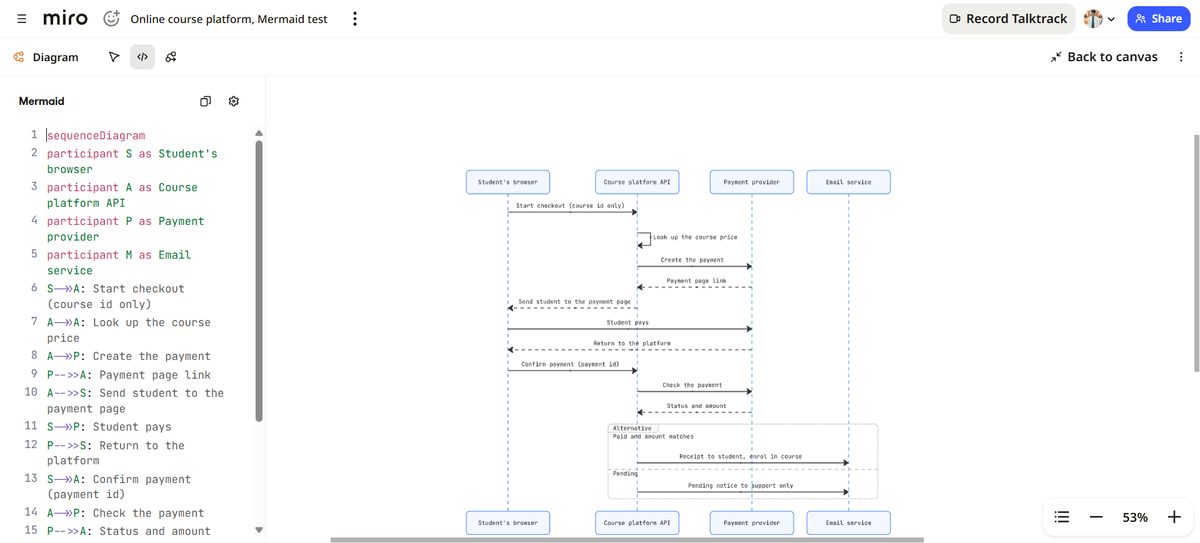
This is the result that matters most. A diagram that is missing a branch still looks finished. If you share it without checking, your team reviews a payment flow with no failure path.
Test 3: drop a file instead
For the ER diagram we used Miro's other documented route and dropped a .mmd file onto the board. It rendered with no error banner: five tables, their columns and the relationships between them, as native Miro shapes.
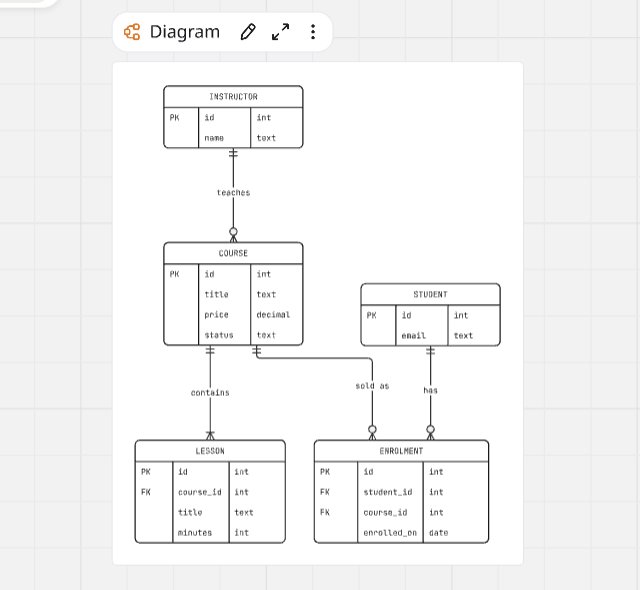
So if you work on Windows, dropping a file avoided the problem in our test. We didn't test the MCP route or a Mac. Neither goes through the Windows clipboard, so you may never see this, but we haven't confirmed it.
Test 4: edit on the board, and the code follows
In focus mode, we double-clicked the "Course published" box and renamed it "Course live in catalogue". The matching line in the code panel changed on its own, to G[Course live in catalogue].
Selecting a shape also highlights its line in the code, which makes a long diagram much easier to work through.
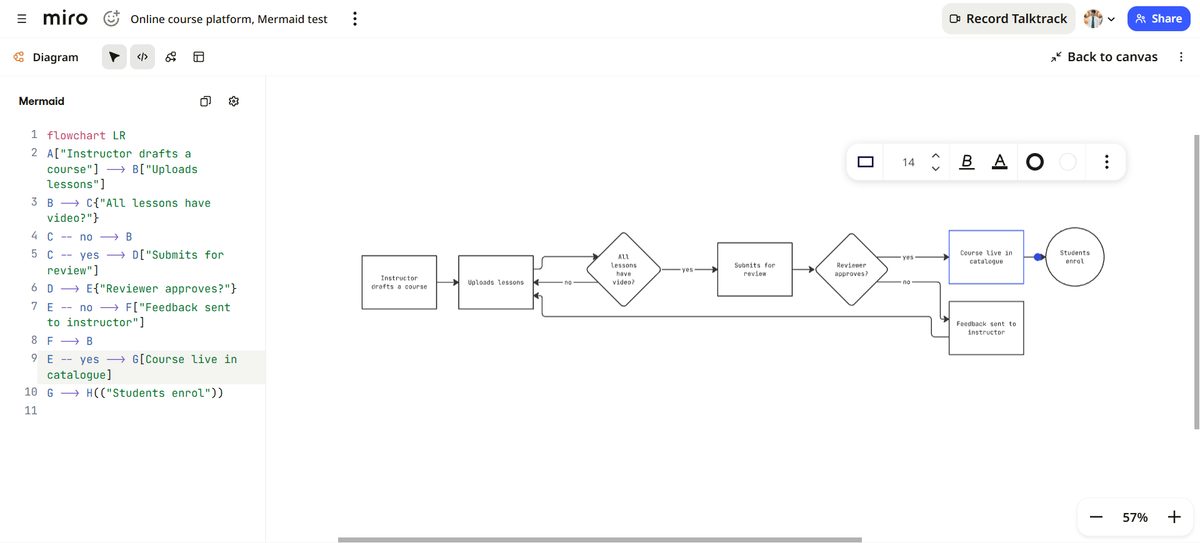
Editing the code worked the other way too: every time we changed it, the diagram redrew within a second or two.
Test 5: the one move to avoid
Then we tried to drag a shape somewhere else. Miro stopped us with a prompt: "Switch to free-form to move shapes."
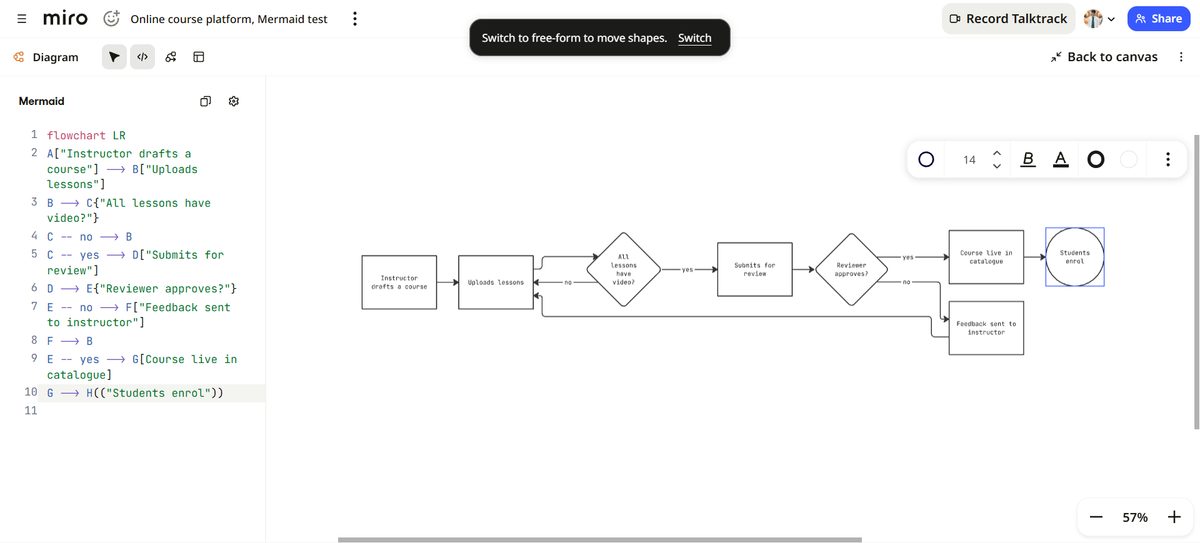
We didn't switch. Miro's help page explains why that matters: once a diagram goes free-form, it is no longer linked to its Mermaid code, and agents can no longer edit it through MCP. Miro offers to switch a copy instead, which is the safer choice.
Mermaid diagrams use Miro's automatic layout, so you change the layout with the direction and spacing controls, not by moving shapes.
What you can and can't edit visually
| Diagram type | Rendered as | Visual editing |
|---|---|---|
| Flowchart | Native Miro shapes | Yes |
| Sequence | Native Miro shapes | Coming soon, per Miro |
| Class | Native Miro shapes | Coming soon, per Miro |
| ER | Native Miro shapes | Coming soon, per Miro |
| State | Native Miro shapes | Coming soon, per Miro |
| Other Mermaid types | Mermaid image (SVG) | No |
From Miro's help page, read 17 November 2026. We rendered flowchart, sequence and ER diagrams ourselves.
Miro's help page lists these other limitations:
- Visual editing and the code panel only work in focus mode.
- Visual editing can only do what Mermaid syntax supports.
- Swimlanes aren't supported, because Mermaid doesn't have them.
Using it with Claude and MCP
The setup Miro promotes most is an AI agent connected to its MCP server. Miro's help page says such an agent can create a Mermaid diagram on a board you name, read it back and update it in place, optionally adding a legend for what changed. On Enterprise plans, an admin has to turn MCP on first.
We didn't connect MCP for this test. We had Claude write the Mermaid and moved it onto the board ourselves. Even that way, the combination is fast: describing a system in a sentence or two and getting a reviewable diagram took seconds, and the board made it easy to spot what the text hid.
That's also our main advice. Treat AI-written Mermaid as a draft, and read the rendered diagram before you share it. A missing branch looks fine until you go looking for it.
A quick checklist after you paste
Look for the red error banner above the diagram. Open the code panel: if every line has a warning, it's probably line endings, not your code. Count the branches and end states against what you meant to draw. On Windows, drop a .mmd file instead of pasting. And don't drag shapes unless you mean to leave the code behind.
Who should use it
- Engineering teams that keep diagrams in their repo: this suits you best. The diagram stays text, so it can live next to the code and be reviewed in pull requests, while the board version is for discussion.
- Teams that use AI agents for documentation: Miro's MCP route is built for you, though we didn't test it.
- People who want to arrange shapes freely: Mermaid diagrams use automatic layout, so you'd be working against the feature. Draw by hand instead, or switch a copy to free-form.
Frequently Asked Questions
Is Mermaid in Miro free?
Yes. Miro's help page lists it on the Free, Starter, Business, Enterprise and Education plans, in the browser and the desktop app. We ran our test on the Free plan.
Can I edit a Mermaid sequence diagram visually in Miro?
Not yet. Sequence, class, ER and state diagrams render as native Miro shapes, but Miro lists visual editing for them as coming soon. You edit them in the code panel, and the diagram redraws.
Why does Miro say my Mermaid code has errors when it doesn't?
In our test on Windows, the clipboard added a hidden carriage return to every line when we pasted, and Miro's editor flagged each one. Re-entering the code without them, or dropping a .mmd file instead, cleared the errors.
Does Miro keep the diagram in sync with the code?
Yes, for flowcharts in both directions, as long as you stay out of free-form mode. If you switch a diagram to free-form, it's no longer linked to its Mermaid code.
Can Claude create diagrams in Miro directly?
Miro says AI tools connected to its MCP server, such as Claude Code and Cursor, can create, read and update Mermaid diagrams on a board. We didn't test the MCP connection for this article.
Final verdict
Mermaid in Miro does what it promises: the code becomes a real Miro diagram, flowcharts stay in sync whichever side you edit, and it costs nothing to try. Its limits are clear too: visual editing is flowcharts only for now, and moving a shape breaks the link to the code.
The finding that should change how you use it is the Windows paste. One of our diagrams lost a whole branch without looking broken. Check the code panel after every paste, or drop a file instead.
Article by Sohail Akhtar, Founder of TheToolsVerse. Tested on 17 November 2026 on Miro's Free plan, in Chrome on Windows 11, using diagrams of a made-up sample app. Product details not tested by us come from Miro's help page, read the same day. Claude, an Anthropic model, wrote the Mermaid, ran the test on our account and drafted this article; Sohail Akhtar approved it.
Disclosure: TheToolsVerse is a Miro affiliate. We earn a commission if you subscribe through our links, and Miro's partner program pays a bonus for approved articles, including this one if it is approved. Miro did not review or edit this article. How paid placements work.
Some links may be affiliate links. We may earn a small commission at no extra cost to you.
Related Articles
Explore more guides and reviews from our experts.

AI Tool Home Pages Redirect to HTTPS 94.5% of the Time, but Only 63% Send HSTS, 35% a Content-Security-Policy and 6% All Six Basic Security Headers: We Checked 601

Insightful Pricing (2026): Three Plans, a 50-Seat Minimum and a 14-Day Work Audit