MeetGeek vs Otter.ai: Which AI Notetaker Wins in 2026?
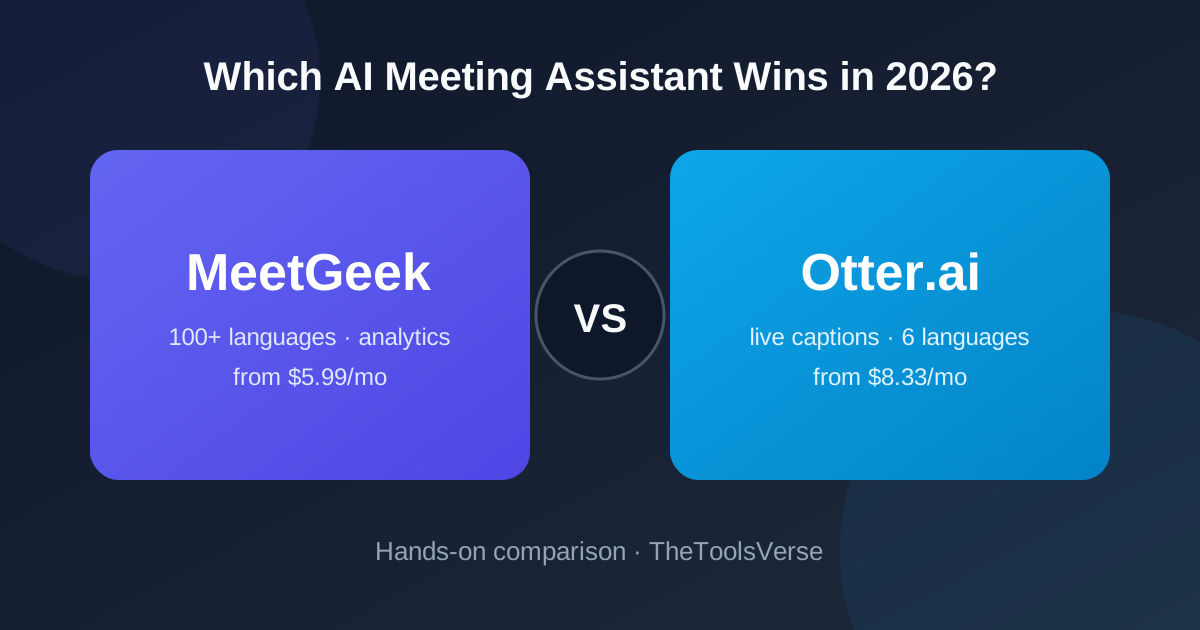
Most MeetGeek vs Otter comparisons bury the two numbers that actually decide this for most people: Otter transcribes 6 languages, MeetGeek transcribes 100+ — and on annual billing, MeetGeek Pro costs $5.99/month while Otter Pro costs $8.33/month. If your meetings ever leave English (or your budget is tight), half this decision is already made.
But there's a real case for Otter too, and it's the one thing MeetGeek genuinely doesn't do. Let's take it apart properly — exact plans, real limits, security, integrations, and who should pick what.
How we compared (and why you can trust it)
We run a tool directory, not a meeting assistant — unlike most pages ranking for this comparison, we're not quietly selling you a third notetaker. Pricing below was verified against both vendors' official pricing pages in July 2026. Feature claims come from both vendors' own documentation and support pages — this is desk research against published material, not a hands-on product test, so we don't claim to have run both tools against the same recording. Both links may earn us a commission; the verdict doesn't change based on which you pick.
The short version
MeetGeek wins on languages (100+ vs 6), price at every tier, custom summary templates, meeting analytics, and integrations — the better after-the-meeting machine. Otter.ai wins on live features: real-time captions everyone in the call can see, plus slide capture. If you need live captions, pick Otter. For everything else, MeetGeek gives you more for less money.
MeetGeek vs Otter at a glance
| MeetGeek | Otter.ai | |
|---|---|---|
| Free plan | 3 hrs/month transcription | 300 min/month, 3 lifetime imports |
| Cheapest paid (annual) | $5.99/user/mo (Pro) | $8.33/user/mo (Pro) |
| Transcription languages | 100+ | 6 (EN, ES, FR, DE, JA, ZH) |
| Live captions in-meeting | No | Yes |
| Slide capture | No | Yes |
| Custom summary templates | Yes (per meeting type) | Generic format |
| Meeting analytics | Yes (talk time, trends) | No |
| Max meeting length (paid) | No cap | 90 min (Pro), 4 hrs (Business) |
| Unlimited transcription tier | Business — $9.99/user/mo annual | Business — $19.99/user/mo annual |
| Automations | Zapier, Make, n8n, native integrations | Fewer, mostly native |
| Platforms | Zoom, Meet, Teams | Zoom, Meet, Teams |
| My rating | 4.4 / 5 | 4.1 / 5 |
Pricing verified from both vendors' pricing pages, July 2026.
The language gap is bigger than it looks
Otter supports transcription in exactly six languages: English, Spanish, French, German, Japanese, and Chinese — that's straight from their own pricing page. MeetGeek transcribes 100+ languages, including Hindi, Portuguese, Arabic, Italian, Dutch, Korean, and basically any language your clients or teammates actually speak.
If you're a fully English-speaking team, this doesn't matter. But if you run international sales calls, work with offshore teams, or record client calls in mixed languages, this single row of the table ends the comparison. I've seen teams buy Otter, hit this wall in week two, and migrate.
And a nuance the marketing pages skip: "supports a language" isn't binary. Accuracy in any transcription tool drops with heavy accents, crosstalk, and bad microphones — in both tools. Whatever you pick, test it on your worst-audio recurring meeting during the free plan, not the vendor's demo clip.
Pricing, plan by plan (the numbers most comparisons skip)
| Plan | MeetGeek | Otter.ai |
|---|---|---|
| Free | $0 — 3 hrs/mo, AI summaries, 100+ languages | $0 — 300 min/mo, 3 lifetime file imports |
| Pro (monthly) | $9.99/user | $16.99/user |
| Pro (annual) | $5.99/user/mo — 20 hrs/mo | $8.33/user/mo — 1,200 min/mo, 90-min meeting cap |
| Business (monthly) | $17/user | $30/user |
| Business (annual) | $9.99/user/mo — unlimited transcription | $19.99/user/mo — unlimited, 4-hr meeting cap |
| Enterprise | Custom (SSO/SCIM, on-prem options) | Custom (SSO, HIPAA add-on) |
Run the team math and it gets stark. A 10-person team on Business annual:
- MeetGeek: ~$1,199/year (unlimited transcription, no meeting cap)
- Otter: ~$2,399/year (unlimited, but 4-hour meeting cap)
Same headcount, same "unlimited" promise — Otter costs literally double. MeetGeek also gives startups, non-profits, and edu teams a 30% discount on top. Otter's counter: a 20% student discount on Pro with a .edu email.
Watch the caps, too. Otter Pro cuts individual meetings at 90 minutes — a real problem for workshops, trainings, or board meetings. MeetGeek doesn't cap meeting length; the plans limit total monthly hours instead (20 hrs on Pro, unlimited on Business). Think about which failure mode hurts you more: a meeting that cuts off mid-session (Otter Pro), or running out of monthly hours (MeetGeek Pro).
Try MeetGeek free — 3 hours of meetings monthly
Auto-join, transcribe in 100+ languages, and get structured summaries with action items — without taking a single note. Free plan, no card.
Get MeetGeek FreeMeetGeek: the after-meeting machine
Pros & Cons
Pros
- +100+ transcription languages vs Otter's 6
- +Cheaper at every single tier — half Otter's price on Business
- +Custom summary templates per meeting type (standup, sales call, interview)
- +Meeting analytics: talk-time ratios, meeting habits, topic trends
- +Workflow automations push notes to Slack, Notion, HubSpot, CRMs via Zapier/Make/n8n
- +Unlimited transcription on Business with no meeting-length cap
- +30% discount for startups, non-profits, education
Cons
- −No live captions participants can see during the call
- −No slide capture from screen shares
- −Summaries arrive minutes after the meeting ends, not during
- −Newer brand — smaller community than Otter's
MeetGeek's whole design bet is that the value of a meeting assistant shows up after the call: structured summaries shaped to the meeting type, action items extracted automatically, everything searchable forever, and notes pushed into the tools where work actually happens.
What setup actually looks like: you connect your Google or Outlook calendar, choose which meetings the bot should join (all, external-only, or per-meeting), and it silently attends and records. Within minutes of the meeting ending you get an email with the summary, and the full transcript lands in your searchable library. First useful summary takes about ten minutes of setup, most of which is deciding which meetings to include.
The analytics layer is genuinely unique here. MeetGeek will tell you your team's talk-to-listen ratio, how often people interrupt, how much of your week burns in recurring meetings, and which topics keep recurring. For managers coaching sales reps or trying to cut meeting load, no mainstream competitor — Otter included — offers this.
Summary templates matter more than they sound. A sales call summary needs objections, budget signals, and next steps. A standup needs blockers. An interview needs candidate strengths and flags. MeetGeek ships templates per meeting type and lets you build custom ones; Otter hands every meeting the same generic outline. If you run varied meeting types, this is the difference between "notes I actually use" and "notes I re-read and reorganize."
The trade-off: during the meeting itself, MeetGeek is invisible. Which brings us to the one reason to pick Otter.
Otter.ai: the live-meeting layer
Pros & Cons
Pros
- +Real-time captions visible to all participants in Zoom
- +Slide capture — screenshots decks into the notes automatically
- +Mature product with strong cross-meeting search
- +Speaker identification is reliable after light training
- +OtterPilot can auto-join and email recaps
- +Student discount (20% off Pro with .edu email)
Cons
- −Only 6 transcription languages
- −Nearly double MeetGeek's price at Business tier
- −90-minute meeting cap on Pro plan
- −One generic summary format regardless of meeting type
- −No meeting analytics
- −3 lifetime file imports on free plan (not monthly)
Otter's killer feature is live: real-time captions that everyone in the meeting can see — invaluable for accessibility (deaf and hard-of-hearing participants), and genuinely useful in noisy calls or heavy-accent environments where a live text stream keeps everyone aligned. Slide capture is the other differentiator: present a deck and Otter screenshots it into the transcript at the right moments, so the notes carry the visuals the discussion referenced.
Otter is also the older, more battle-tested product with a bigger user community — if your team already lives in it, the switching cost is real and worth counting.
If live captions or slide capture are requirements, Otter is the correct answer and price stops mattering. For everyone else, you're paying more for fewer languages and a generic summary.
"Pick the tool for the moment you actually need help. If it's during the meeting — captions, accessibility, slides — that's Otter. If it's everything that happens after the meeting — notes, action items, CRM updates — MeetGeek does more and charges less."
Integrations: where the notes actually go
A notetaker is only as useful as where it can send the notes.
MeetGeek connects natively to Slack, Notion, Trello, HubSpot, Salesforce and other CRMs, plus Zapier, Make, and n8n — which effectively means thousands of destinations and real workflow automation (e.g., "after every sales call, append the summary to the deal record and post action items to the team channel"). Automation triggers fire per meeting type, which pairs well with its templates.
Otter covers the core: calendar auto-join for Zoom/Meet/Teams, Slack sharing, and CRM export on Business tier. It's serviceable, but the automation ceiling is lower — Otter expects you to live in Otter, while MeetGeek assumes you live in your CRM and Slack.
If your notes must flow into a system of record automatically, MeetGeek's integration surface is decisively wider.
Security and privacy (the section every comparison skips)
Both products record workplace conversations, so this matters more than any feature:
- Otter: SOC 2 compliant; enterprise tier adds SSO, SCIM, and a HIPAA compliance add-on — relevant for healthcare teams.
- MeetGeek: GDPR-compliant with encryption in transit and at rest; Enterprise adds SSO/SCIM and on-premise storage options — relevant for teams that can't ship recordings to third-party cloud.
- Both: the bot appears as a named participant in meetings, so attendees can see recording is happening. Whichever you choose, check your local consent laws (some jurisdictions require all-party consent) and set the bot to announce itself.
If you're in a regulated industry, Otter's HIPAA add-on or MeetGeek's on-prem option may decide this on the spot — before any feature comparison.
Which one fits you?
Pick MeetGeek if:
- Your meetings happen in (or drift into) languages beyond Otter's six
- You want summaries formatted per meeting type — sales call ≠ standup ≠ interview
- You push notes into HubSpot, Slack, Notion, or a CRM automatically
- You're cost-sensitive: it's cheaper at every tier, and half price at Business
- You run meetings longer than 90 minutes
- You want meeting analytics to actually reduce meeting load
Pick Otter if:
- You need live captions participants can see (accessibility is the strongest reason)
- Slide capture from screen shares matters to your notes
- You're in healthcare and need the HIPAA add-on
- You're a student — 20% .edu discount on Pro
- Your team is English-only and already comfortable in Otter's ecosystem
If you're still torn: both have free plans (MeetGeek 3 hrs/mo, Otter 300 min/mo). Run both bots into the same three meetings this week and compare the summaries they hand back. The difference in structure is obvious by meeting two. You can also check our full MeetGeek profile and Otter.ai profile for deeper feature breakdowns.
Worth a look beyond these two?
Quick honesty check on the wider field, since "MeetGeek vs Otter" is rarely the whole shortlist:
- Fireflies.ai — closest MeetGeek rival, strong integrations and search, ~69+ languages; solid middle ground if MeetGeek's analytics don't matter to you.
- Fathom — genuinely good free plan for individuals; less suited for team-wide rollout.
- tl;dv — creator-friendly clipping features; good for product/UX research interviews.
- TurboScribe — pure file transcription at high volume, not a meeting bot (we compared it against Otter in our TurboScribe vs Otter breakdown).
If a meeting bot feels heavy for your use case (e.g., you mostly transcribe recorded files), a dedicated transcription tool beats both — that's a different job.
Migrating from Otter to MeetGeek (or back)
Switching costs are lower than they look. Both tools let you export transcripts (Otter: TXT/DOCX/SRT/PDF; MeetGeek: TXT/DOCX and workspace exports). The practical playbook:
- Export your historical transcripts from the old tool (do this before canceling — free plans restrict exports).
- Run both bots in parallel for one week — there's no conflict; both can join the same meeting.
- Rebuild your 2–3 key automations (CRM push, Slack posts) in the new tool.
- Cancel the loser at the end of the billing cycle.
The parallel-week test is the single most reliable way to settle this comparison for your specific meetings, accents, and audio quality.
Frequently Asked Questions
Is MeetGeek better than Otter.ai?
For most post-meeting workflows, yes: MeetGeek supports 100+ transcription languages to Otter's 6, produces summaries customized per meeting type, includes meeting analytics, and costs roughly half of Otter at the Business tier ($9.99 vs $19.99/user/month annual). Otter is better specifically for live, in-meeting features like participant-visible captions and slide capture.
Is MeetGeek cheaper than Otter?
Yes, at every tier. MeetGeek Pro is $5.99/user/month annual vs Otter Pro at $8.33; MeetGeek Business (unlimited transcription) is $9.99 vs Otter Business at $19.99. MeetGeek also offers a 30% discount for startups, non-profits, and education; Otter offers 20% off Pro for students.
Does Otter.ai support other languages?
Otter transcribes six languages: English, Spanish, French, German, Japanese, and Chinese. If you need Hindi, Portuguese, Arabic, or anything else, MeetGeek's 100+ language support is the practical choice.
Do MeetGeek and Otter both work with Zoom, Google Meet, and Teams?
Yes — both auto-join scheduled meetings on all three platforms. The difference is what happens next: Otter can caption live inside the meeting; MeetGeek focuses on the structured summary, action items, and integrations after it ends.
Is Otter.ai HIPAA compliant?
Otter offers a HIPAA compliance add-on on its Enterprise tier, which matters for healthcare teams. MeetGeek counters with GDPR compliance and on-premise storage options at Enterprise level. In regulated industries, verify the specific compliance package with the vendor before rollout.
Can I use MeetGeek for free?
Yes — MeetGeek's free plan includes 3 hours of transcription monthly with AI summaries and full language support, no credit card required. Otter's free plan gives 300 minutes monthly but only 3 file imports for the lifetime of the account.
What's the meeting length limit on Otter?
Otter Pro caps individual meetings at 90 minutes and Business at 4 hours. MeetGeek doesn't cap meeting length — its plans limit total monthly transcription hours instead (20 hrs on Pro, unlimited on Business).
Final verdict
This one is less of a coin flip than the SERP makes it look. Otter.ai is the right tool for specific, legitimate needs: live captions, slide capture, HIPAA healthcare deployments, and students on discount. MeetGeek wins everything else — languages, summary quality per meeting type, analytics, integrations, meeting length, and price — often by a factor of two.
Start with the free plan, point it at this week's meetings, and see how it feels to never take notes again.
Never take meeting notes again
MeetGeek joins your calls, transcribes in 100+ languages, and delivers structured summaries with action items — free plan included.
Try MeetGeek FreeArticle by Sohail Akhtar, Founder of TheToolsVerse. Pricing verified against both vendors' official pricing pages, July 2026. We don't sell a meeting assistant — see how we review.
Some links are affiliate links. If you buy through them, we may earn a small commission at no extra cost to you — it's how we keep the directory free.
Some links may be affiliate links. We may earn a small commission at no extra cost to you.
Related Articles
Explore more guides and reviews from our experts.