InboxAlly vs MailReach vs GlockApps: Deliverability Tools 2026
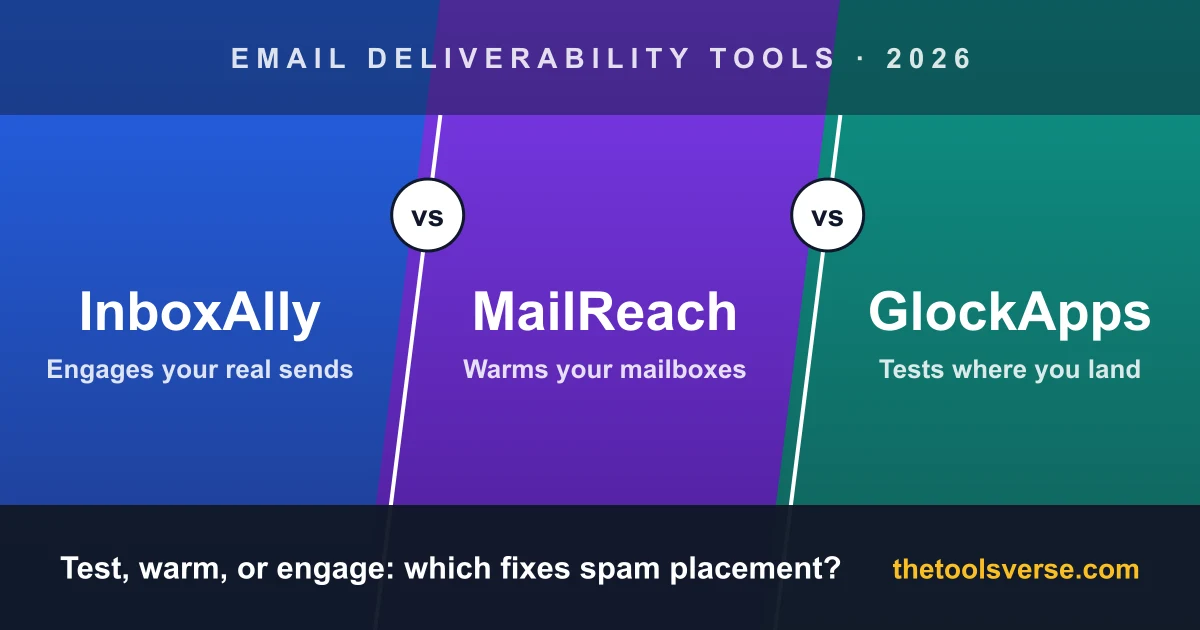
When your emails start landing in spam, the advice you get is usually "use a deliverability tool". That advice skips the important part. InboxAlly, MailReach and GlockApps are all called deliverability tools, and they do three different jobs.
GlockApps tells you where your email lands. MailReach warms your mailboxes so they build a sending history. InboxAlly engages with the emails you actually send, so mailbox providers see your real campaigns being opened, rescued from spam and replied to. Buy the wrong one for your problem and you'll pay for a month of a tool that was never going to fix it.
So instead of ranking them on one scale, this comparison sorts them by job. Every price below was read from each vendor's own pricing page on 23 October 2026.
The short version
GlockApps is a testing and monitoring tool: inbox placement tests, DMARC reports, blocklist alerts. It diagnoses, it doesn't change your placement. MailReach is a warmup tool priced per mailbox, with spam tests included. It suits cold emailers running many inboxes. InboxAlly adds seed-inbox engagement to your real sends through any ESP, including newsletters and marketing mail. It's the lever to pull when your setup is clean and you're still landing in spam or Promotions. Whatever you choose, run a free placement test first.
InboxAlly vs MailReach vs GlockApps at a glance
| InboxAlly | MailReach | GlockApps | |
|---|---|---|---|
| Core job | Engagement on your real sends | Mailbox warmup | Testing + monitoring |
| How it works | Seed inboxes open, rescue and reply to your campaigns | A warmup network exchanges emails with your mailbox | Seed addresses report where a test email landed |
| Changes your placement? | Yes, by adding positive signals | Yes, by building sending history | No, it diagnoses |
| Works on | Any ESP, cold or marketing mail | Connected mailboxes | Any sender |
| Free option | 10-day trial, no card; free placement tester | Free spam test | Free plan, 2 spam-test credits |
| Entry price | $149/month | $19.50/mailbox/month (calculator) | $59/month billed annually |
| Priced by | Sender profile + seed emails a day | Mailbox | Plan (test credits, DMARC volume) |
| Best for | Clean setup, still in spam or Promotions | Cold emailers with many inboxes | Finding out what's wrong |
Start with a test, not a tool
Before you pay for anything, find out whether you have a placement problem and where it is. A campaign with a 12% open rate might be landing in spam at Outlook and fine at Gmail, or it might be in the inbox everywhere and simply not interesting. Those need completely different fixes, and only a placement test tells them apart.
All three vendors give you a free way to check:
- InboxAlly's Email Placement Tester needs no signup. It gives you 16 tester addresses across Gmail, Outlook and Yahoo. You send a real campaign to them from your normal platform and watch each one report as Inbox, Spam or Missing. It allows one free test a day per sending domain. Because the email goes out through your real setup, the result is your real placement, not a simulation. It's the quickest of the three to get an answer from.
- GlockApps' free plan includes 2 spam-test credits, plus DMARC report processing for up to 10,000 messages a month.
- MailReach offers a free spam test on its site, and its paid plans include spam-test credits.
Read the result before you buy
If the test shows you landing in the inbox, a deliverability tool won't raise your reply rate. Look at your copy and your list instead. If it shows spam at one provider only, check your authentication for that provider first. Only when you're in spam or Promotions with a clean setup is it time to choose between warmup and engagement.
Fix the basics first, because none of these will
There's a step none of these three tools can do for you, and it's the one most often skipped. Before warmup or engagement can help, these have to be right:
- SPF, DKIM and DMARC published and passing for the domain you send from.
- List quality. Bounces and spam traps damage sender reputation faster than any tool can repair it.
- Volume ramp. A new domain going from zero to hundreds of emails a day in week one gets flagged everywhere.
- Content people want. If real recipients ignore or report your mail, that signal counts, whatever else you do.
GlockApps and InboxAlly will both show you authentication problems. Neither can publish a missing DNS record for you.
InboxAlly: engagement on the emails you actually send
InboxAlly works on a different part of the problem from the other two. You add its seed addresses to the campaigns you already send, from Instantly, HubSpot, Klaviyo, your own SMTP server or anything else that sends to a list. Its seed inboxes then engage with that mail. InboxAlly lists six actions: opening and scrolling through the message, moving it out of spam, moving it out of Gmail's Promotions tab, marking it important, replying with a short generic reply, and clicking a link. It says the opens come from different machines and IP addresses across US locations, and it needs no access to your email accounts or sending software.
That's the real difference from warmup. A warmup network builds history with separate warmup emails. InboxAlly puts the engagement on your actual campaigns, the ones mailbox providers are judging. That's why it works for newsletters and marketing broadcasts as well as cold outreach, and why it can target the Promotions tab, which warmup doesn't touch. It does include an automated warmup sequence for new domains, but the seeding is what you're paying for.
Around that, you get an IA Score and Reputation Score for sender health, placement testing, blacklist monitoring, DMARC reporting, a Google Postmaster integration, a REST API, and CRM integrations including HubSpot and Klaviyo.
Pricing is published. At this price point that's rarer than it should be:
- Starter: $149/month, 100 seed emails a day, 1 sender profile
- Plus: $645/month, 500 seed emails a day, 5 sender profiles
- Premium: $1,190/month, 1,000 seed emails a day, 10 sender profiles, plus phone/Zoom support and weekly strategy reviews
- Enterprise: custom
Billing is monthly, and the 10-day trial needs no card. InboxAlly notes that a full reputation repair usually takes four to eight weeks, so the trial is the place to learn the workflow and see the first movement.
Pros & Cons
Pros
- +Engagement lands on your real campaigns, not on separate warmup emails
- +Works with any ESP and needs no access to your email accounts
- +Targets Gmail's Promotions tab as well as the spam folder
- +Works for marketing and newsletter mail, not only cold outreach
- +Published prices and a 10-day trial with no card
- +The free placement tester needs no signup
Cons
- −Priced per sender profile, so teams rotating many domains will need Plus or above
- −Works best once SPF, DKIM, DMARC and list hygiene are in place
- −Reputation repair takes several weeks, so judge results beyond the trial
Who it's for: a sender whose authentication is passing and whose list is clean, but whose mail still lands in spam or Promotions. That's the point where warmup has done what it can. It also fits marketing and newsletter senders, who don't have a warmup option at all.
Check your placement free, then decide
Send one real campaign to 16 tester inboxes at Gmail, Outlook and Yahoo and see where it lands. No signup. If you're in spam with a clean setup, InboxAlly's 10-day trial needs no card.
Run the free placement testMailReach: warmup for people running many mailboxes
MailReach is a warmup tool. You connect a mailbox and MailReach's warmup network exchanges emails with it, building the sending history a new or damaged mailbox needs. The vendor describes the network as Google Workspace and Office 365 inboxes, with "organic, human-like" activity rather than canned replies.
It's priced per mailbox, which is the right shape for cold email, where you might run 20 inboxes across five domains. MailReach's pricing calculator showed $19.50 per mailbox per month on 23 October 2026. The rate depends on how many mailboxes you connect, and annual billing saves 20%. Every plan includes at least 20 spam-test credits, and one credit is one placement test with a deliverability report.
Pros & Cons
Pros
- +Per-mailbox pricing scales sensibly for cold email
- +Spam-test credits included, so you can measure your own progress
- +Network described as Google Workspace and Office 365 inboxes
- +Annual billing saves 20%
Cons
- −Warms the mailbox, not the campaigns you actually send
- −No help with Promotions-tab placement for marketing mail
- −Costs add up per mailbox if you run a large fleet
- −Most cold email senders (Instantly, Smartlead) already include warmup
Who it's for: cold emailers with several new mailboxes who want a dedicated warmup with built-in testing. If you already use Instantly or Smartlead, check what their built-in warmup gives you before you add a second one. See MailReach's pricing.
GlockApps: find out what's actually wrong
GlockApps doesn't change your placement. It tells you what your placement is and why. Its inbox placement test shows where a test email lands across the major providers, including Gmail, Yahoo, AOL and Outlook, and adds spam-filter scores from Google, Barracuda and SpamAssassin. Around that sit DMARC analytics with daily reports, monitoring against 50+ blocklists, and uptime monitors that also watch your SPF, DKIM and DMARC records.
There's a genuine free plan with 2 spam-test credits and 10,000 DMARC messages a month. Paid plans start at $59/month billed annually (Essential, $708 a year), rising through Growth and Enterprise, with more test credits and DMARC volume at each step.
Pros & Cons
Pros
- +Detailed diagnosis: placement, spam filters, DMARC, blocklists
- +A real free plan with DMARC monitoring included
- +Explains why you're in spam, not only that you are
- +Useful for agencies auditing many client domains
Cons
- −Doesn't improve placement on its own
- −No warmup; the vendor points you to third-party warmup services
- −Free plan covers only two tests
- −Reports take some deliverability knowledge to act on
Who it's for: anyone who needs to know why they're in spam before deciding how to fix it, and agencies monitoring client domains. It pairs naturally with either of the other two. See GlockApps' pricing.
Pricing, side by side
| InboxAlly | MailReach | GlockApps | |
|---|---|---|---|
| Free | Placement tester (1/day); 10-day trial, no card | Free spam test | Free plan: 2 test credits, DMARC |
| Entry paid | $149/mo Starter | $19.50/mailbox/mo (calculator) | $59/mo Essential, billed annually |
| Next tier | $645/mo Plus | Lower per-mailbox rate at volume | Growth |
| Annual billing | None shown | Saves 20% | Annual price shown |
| You're paying for | Engagement on real sends | Mailbox history | Diagnosis |
The three price on different units, so compare them against your own setup rather than line by line. MailReach charges per mailbox, which suits a fleet of cold-email inboxes that need history. InboxAlly charges per sender profile and works on your real campaigns, so it covers marketing mail and Promotions-tab placement that warmup doesn't reach. GlockApps charges for diagnosis, which is useful alongside either.
Which one should you pick?
- You don't know why you're in spam → start with a free test from GlockApps or InboxAlly, then decide.
- You have new cold-email mailboxes with no history → MailReach, or the warmup already built into your sender.
- Your setup is clean and warmed, and you're still in spam or Promotions → InboxAlly. Engagement on your real sends is the lever warmup doesn't pull.
- You send newsletters or marketing mail, not cold email → InboxAlly. Warmup networks are built for mailboxes, not broadcasts.
- You manage deliverability for clients → GlockApps for monitoring, plus one of the other two for the fix.
They aren't mutually exclusive. A sensible order is test, fix the basics, warm new mailboxes, then add engagement if placement is still poor.
Where this fits in a cold email stack
If you're sending cold email, these tools sit beside your sender, not instead of it. Your sender, whether Instantly, Smartlead or another, handles sequences, inbox rotation and usually warmup. A placement test tells you whether that's working. Engagement is what you add when it isn't. For how the senders themselves compare, see Instantly vs Apollo, Instantly vs Smartlead and my ranked list of the best AI cold email tools.
Frequently Asked Questions
What's the difference between InboxAlly and MailReach?
MailReach is a warmup tool. Its network exchanges warmup emails with your connected mailbox to build sending history. InboxAlly adds engagement to the real emails you send: its seed inboxes open them, move them out of spam and Promotions, and reply. MailReach is priced per mailbox; InboxAlly per sender profile, from $149/month.
Is GlockApps better than InboxAlly?
They do different jobs. GlockApps tests and monitors: it tells you where your email lands and why, through placement tests, DMARC reports and blocklist monitoring. InboxAlly changes placement by adding engagement signals to your sends. Many senders use a test tool to diagnose and an engagement or warmup tool to fix.
How do I test if my emails are going to spam?
Run an inbox placement test. InboxAlly's Email Placement Tester is free with no signup: send a real campaign to its 16 tester addresses across Gmail, Outlook and Yahoo and see each one land as Inbox, Spam or Missing. GlockApps' free plan includes 2 tests, and MailReach offers a free spam test.
Do I need a warmup tool if I use Instantly or Smartlead?
Usually not a separate one. Both include warmup for connected mailboxes. A dedicated warmup tool like MailReach makes more sense if your sender doesn't include it or you want built-in placement testing. Engagement tools like InboxAlly solve a different problem, so they aren't a replacement for warmup.
Can a deliverability tool fix a domain with bad authentication?
No. If SPF, DKIM or DMARC are missing or failing, fix the DNS records first. GlockApps and InboxAlly will flag the problem, but no warmup or engagement tool can override failing authentication.
Final verdict
Stop asking which deliverability tool is best and ask which job you need done. GlockApps answers "where am I landing, and why?" MailReach answers "how do I build history on new mailboxes?" InboxAlly answers "my setup is clean, so why am I still in spam or Promotions?"
Whichever you're facing, start with a free placement test. It costs nothing and it'll tell you which of these three you actually need.
Explore more email tools
Browse cold email senders, deliverability tools and email marketing platforms in our directory.
Explore Email ToolsArticle by Sohail Akhtar, Founder of TheToolsVerse. Prices checked on each vendor's own pricing page on 23 October 2026.
InboxAlly is a paid partner of TheToolsVerse, and we're a member of its affiliate programme. The comparison, pros and cons and verdict above are our own independent assessment. MailReach and GlockApps are not paid placements. How partner placements work.
Some links may be affiliate links. We may earn a small commission at no extra cost to you.
Make an AI tool? Get it into a comparison like this.
Related Articles
Explore more guides and reviews from our experts.