Amplemarket Duo Copilot: A Weekly Signal Routine for a Small Sales Team
Disclosure
Paid partnership with Amplemarket. TheToolsVerse is an Amplemarket partner: links to Amplemarket in this guide are partner links, and we may earn a commission and a content reward from Amplemarket if you sign up. We are partners, not Amplemarket employees, and we don't speak for the company. Amplemarket gave us a one-month account to create content, not to prospect with, so we did not contact anyone. The screenshots and the findings in the table below come from that account on 4 November 2026, with no mailbox or LinkedIn connected. We created one agent that day, with Autopilot off and no way for it to send anything, and read its feed on 7 November. The routine is our recommendation, not a record of results. How Duo behaves after setup comes from Amplemarket's documentation, and we mark it as such.
Short answer: Amplemarket Duo Copilot watches for the buying signals you choose, finds the people behind them and drafts multichannel outreach for a rep to review. For a small team, we would run it in three short blocks: tune it on Monday, work the feed from Tuesday to Thursday, and score it on Friday. Start with three signals, leave Autopilot off, and read what it says about your company before anything else.
That last part is where we would start, because of what we found on our own account.
What we found before Duo drafted anything
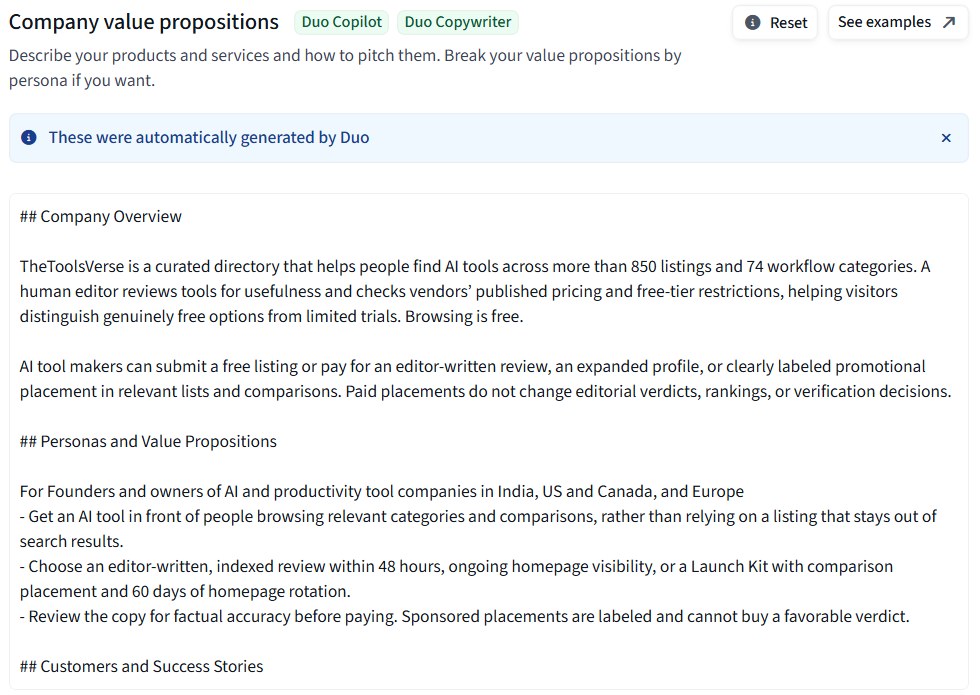
We sell listings and reviews to companies that make AI tools. When we set up our Amplemarket account, it already held value propositions and sequences about our business. We hadn't written them, and the Messaging Settings page says so itself: "These were automatically generated by Duo."
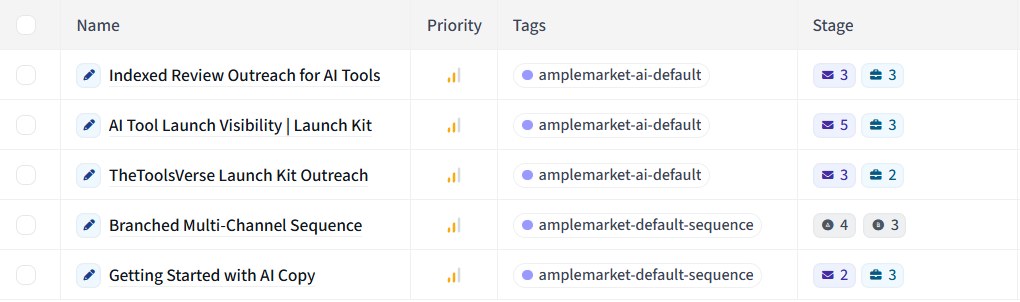
Three of the sequences carried the tag amplemarket-ai-default, so we read every step.
| What we measured on 4 November 2026 | Result |
|---|---|
| Draft sequences on the account after setup | 5 |
| Of those, written about our business | 3 |
| Steps in those 3 sequences | 19 (11 emails, 8 LinkedIn) |
| Steps containing text | 16 |
| Of those, promising buyers could review the copy before paying | 12 |
| Length of those sequences | 6, 9 and 13 days |
| Hours between the drafts being created and that promise going out of date | About 6 |
| Agents available in the app's Create agent library | 20 |
| Signal types the Duo tool can filter by through Amplemarket MCP | 25 |
| Recommendations in our Duo feed, before we created an agent | 0 |
| Audience shown by our first filters | 3,358 (rated "Very narrow") |
| Audience after we widened them | 132,454 |
| Leads waiting in the feed three days later | 46 |
The drafts were good. They got our offer, our 48-hour turnaround and the number of tools we list right. They also repeated this promise:
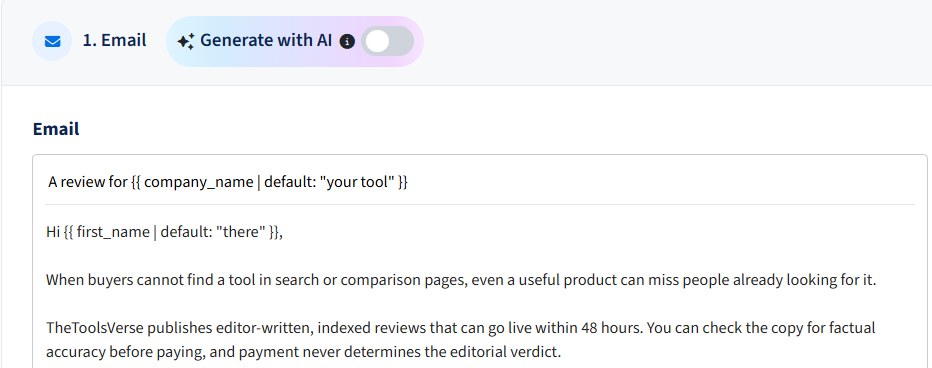
That was true when it was written. Our site said so that day. About six hours later we changed our checkout so that buyers pay first and can ask for a refund. Our website changed. The drafts and the value propositions didn't.
The same promise sits in the value propositions you can see above, and that section is tagged for Duo Copilot and Duo Copywriter. These were setup drafts, so at first we couldn't say whether Duo Copilot itself would repeat the line. Three days later we could: it did, in 3 of the first 10 recommendations it drafted for us (see the first week of leads below). The lesson: your messaging settings are a snapshot of your business, and nothing we saw updates them when your business changes. So the routine below checks them every week.
What Duo Copilot does
According to Amplemarket's product page and University course, Duo Copilot works as a daily loop:
- It scans. Every 24 hours, it looks for the buying signals you've switched on.
- It finds people. It surfaces individuals, not only accounts. For a company signal, it suggests contacts at that company who match your filters.
- It gathers context. You see who the person is, what the company does and the details behind the signal. Since January 2026, Amplemarket says Duo also uses Account Insights and can pull in web searches before it drafts.
- It drafts. Each lead gets a multichannel sequence written for that person and signal.
- You decide. You review, edit, regenerate, send or dismiss, and Duo learns from what you do.
The part that needs a habit is step 5. Duo prepares the work, and it's still your job to look at it. Amplemarket's help centre says a lead goes stale after 14 days with no action and is removed automatically. Miss two weeks, and the feed starts clearing itself without you.
Before week one: three things to set up
You can start a free trial or book a demo if you don't have an account yet. Then do these once.
1. Read what it will say about you
Open Settings → Duo Control Center → Messaging Settings and read your company value propositions as if you were the buyer. Mark every statement that could change: your process, guarantees, turnaround, customer count and integrations. On our account, tone of voice and sequence instructions were both empty, so check those too.
According to Amplemarket's guide to adjusting Duo's sequences, there are five places to shape what Duo writes:
| Setting | Use it for | Who can change it |
|---|---|---|
| Company value propositions | How Duo introduces your product, plus case studies and when to use them | Not limited in the guide |
| Tone of voice | Your style and sales method | Not limited in the guide |
| Sequence instructions | Steps, timing, links and things to mention | Not limited in the guide |
| Agent prompt | Extra instructions for every lead from one agent | Account admins |
| Competitor battlecards | How you compare, for competitor-related agents only | Account admins |
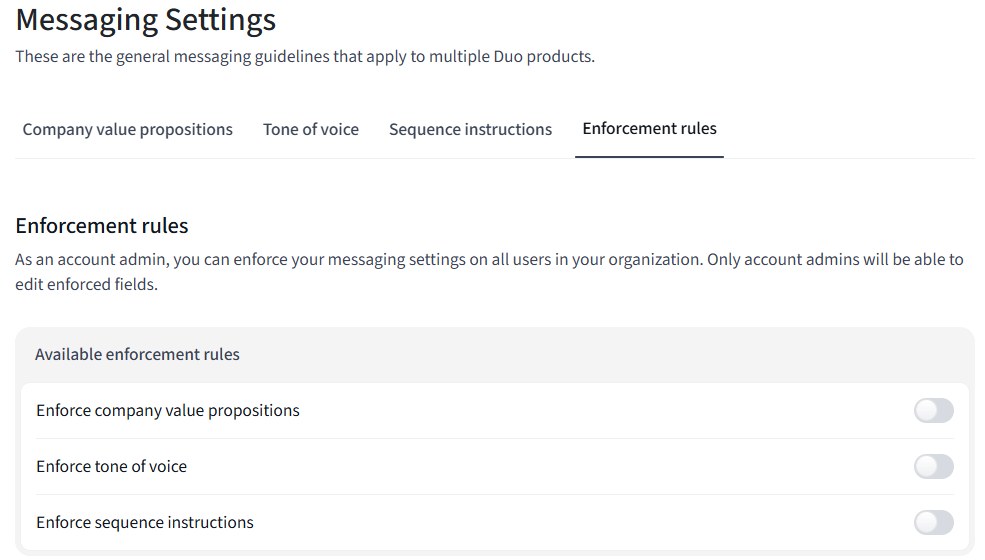
If more than one person sells, look at the Enforcement rules tab too. An admin can lock the value propositions, tone of voice and sequence instructions, so only admins can edit them. That gives you one owner and one version of the truth, which is what the Monday check below needs.
2. Pick three agents, not ten
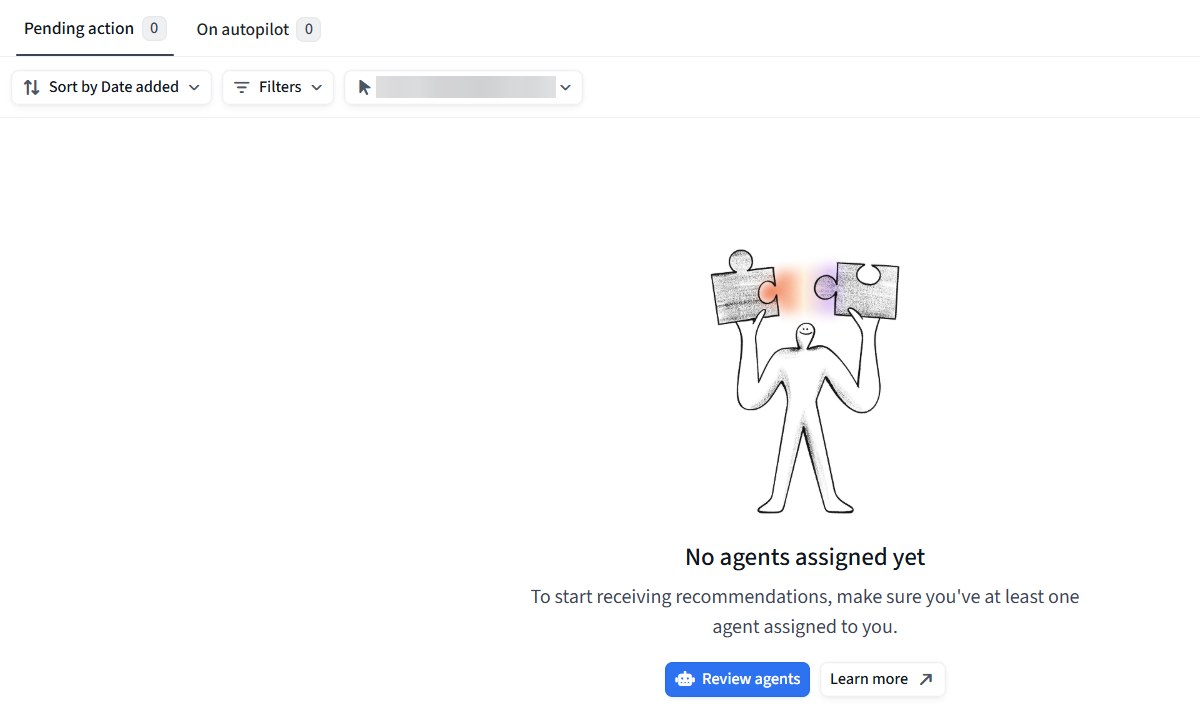
Until you create something, the feed stays empty. This is what a new account sees, and it's a useful reminder that Duo watches only what you tell it to:
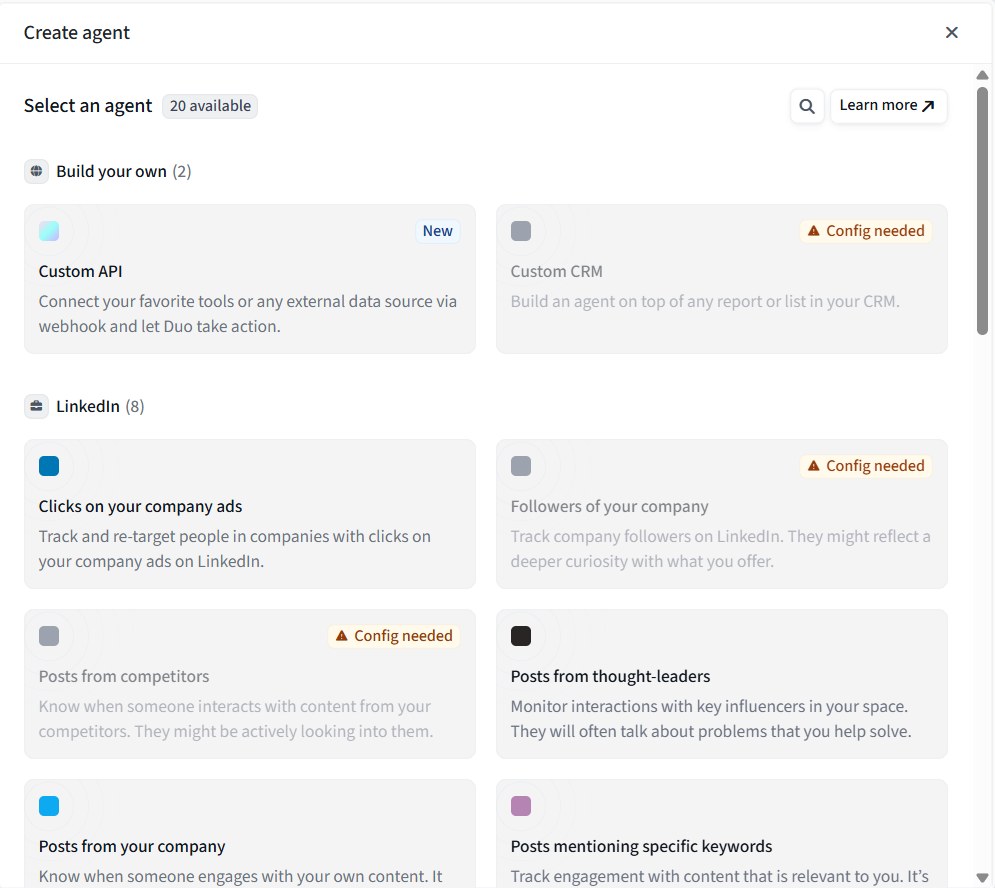
In the app, each signal you watch is an agent. Go to Settings → Duo Control Center → Duo Copilot → Agents and click Create agent. Our library showed 20 agents, grouped by source, and it marks the ones that need something connected first as Config needed:
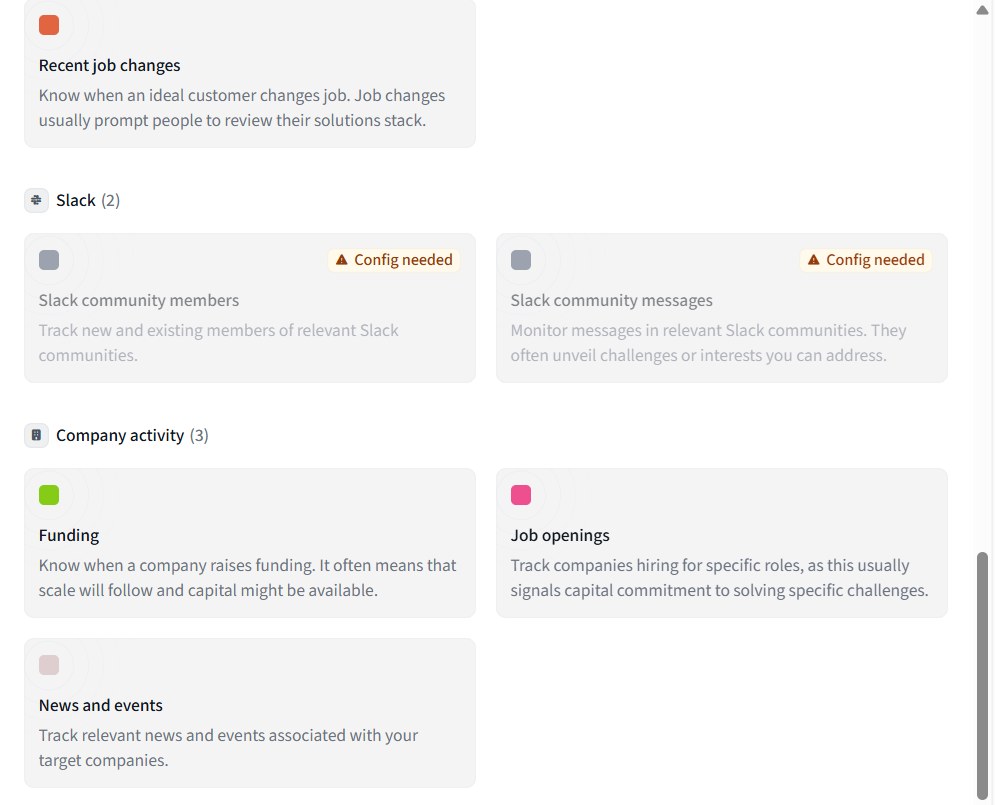
That label saves guesswork. On our account, with nothing connected, the Company activity agents carried no such label, while both Slack agents did:
A small team should start with one agent built on your own data if you have it, one on conversations or competitors, and one on company events. Three is enough to tell which one produces leads you'd actually contact, and you can't learn that from ten agents with a few leads each.
Here is what we would pick for our own business, with no CRM history behind it. The buyer is the founder of a small AI tool company. None of these three showed Config needed on our account:
- Funding, for small AI software companies: new money often means a push for visibility.
- Job openings, for a first marketing or growth hire: they've decided growth matters, and they don't have the person yet.
- Posts mentioning specific keywords, around launches: someone announcing an AI tool this week has the exact problem we solve, this week.
Building the first agent, step by step
We built the Funding agent. Each agent is set up in four steps: Signal, Filters, Distribution and Output.
Signal. Choose what counts as the trigger. The round type is required, with options from Pre-Seed through the Series rounds. We chose Pre-Seed, Seed and Series A.
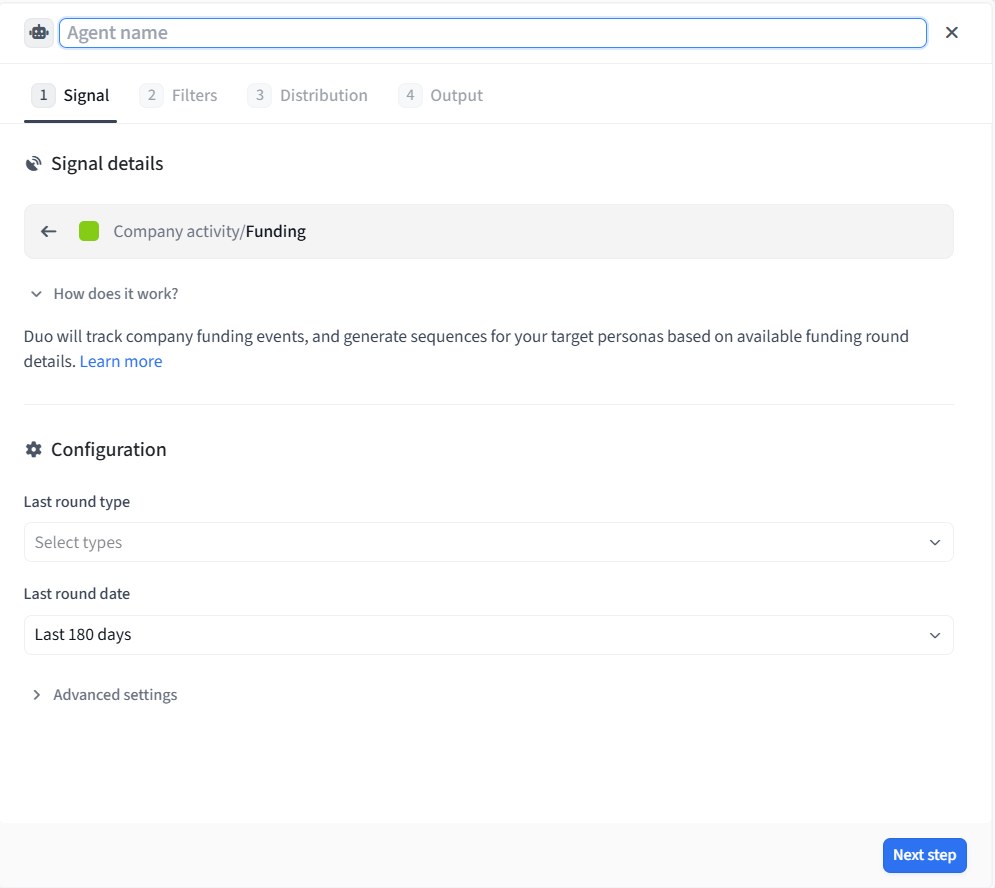
Check the date. Ours was already set to Last 180 days, and a round from five months ago isn't much of a reason to get in touch this week. The list also offered 7, 30 and 90 days, and we chose 30.
Filters. Decide who you want to reach at those companies. Our first attempt was tight: founders and CEOs, at software companies, with "AI" or "artificial intelligence" as company keywords, at companies of 1-10 or 51-200 people. The size list didn't offer us 11-50. That gave 3,358 people, and a small meter by the Import button rated it Very narrow, warning that it might reduce the volume of leads:
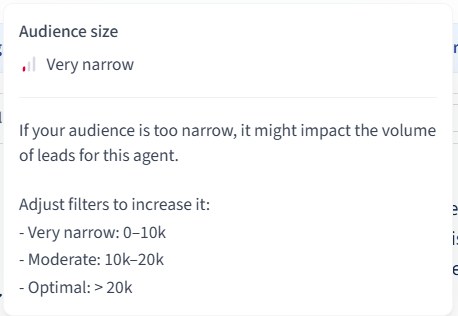
We'd have thought 3,358 was plenty, so hover over that meter. We cleared the industry filter and added marketing and growth leaders to the titles. That took the audience to 132,454, with the meter turning green. As the blue note says, these results aren't yet filtered by the signal, so the leads you receive will be a far smaller group:
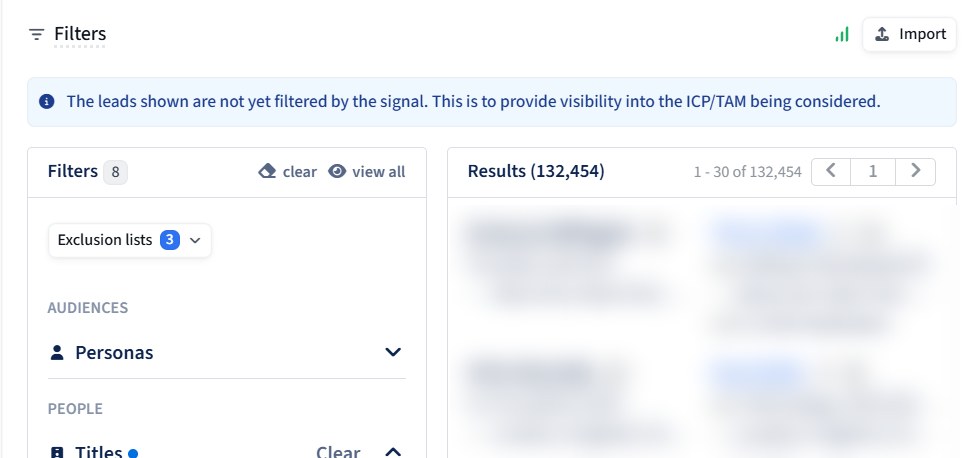
Reading the results was useful as well. Even with the software filter on, some companies were in fields like staffing and HR.
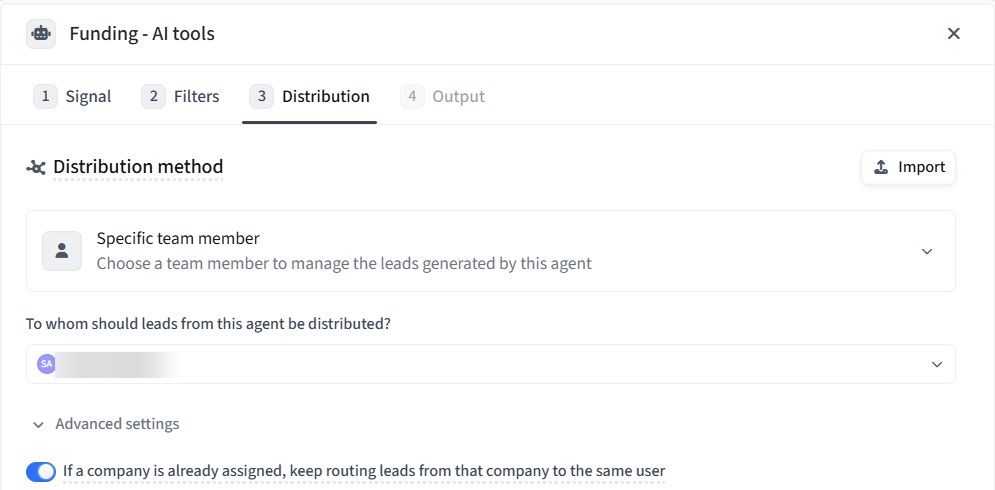
Distribution. Choose who gets the leads. The feed told us it needs an agent assigned to you, so make sure this is set:
Output. This screen shows how the agent will write, how many leads it recommends per company, and the Autopilot switch. We left the default prompt, kept 1 lead per company and left Autopilot off:
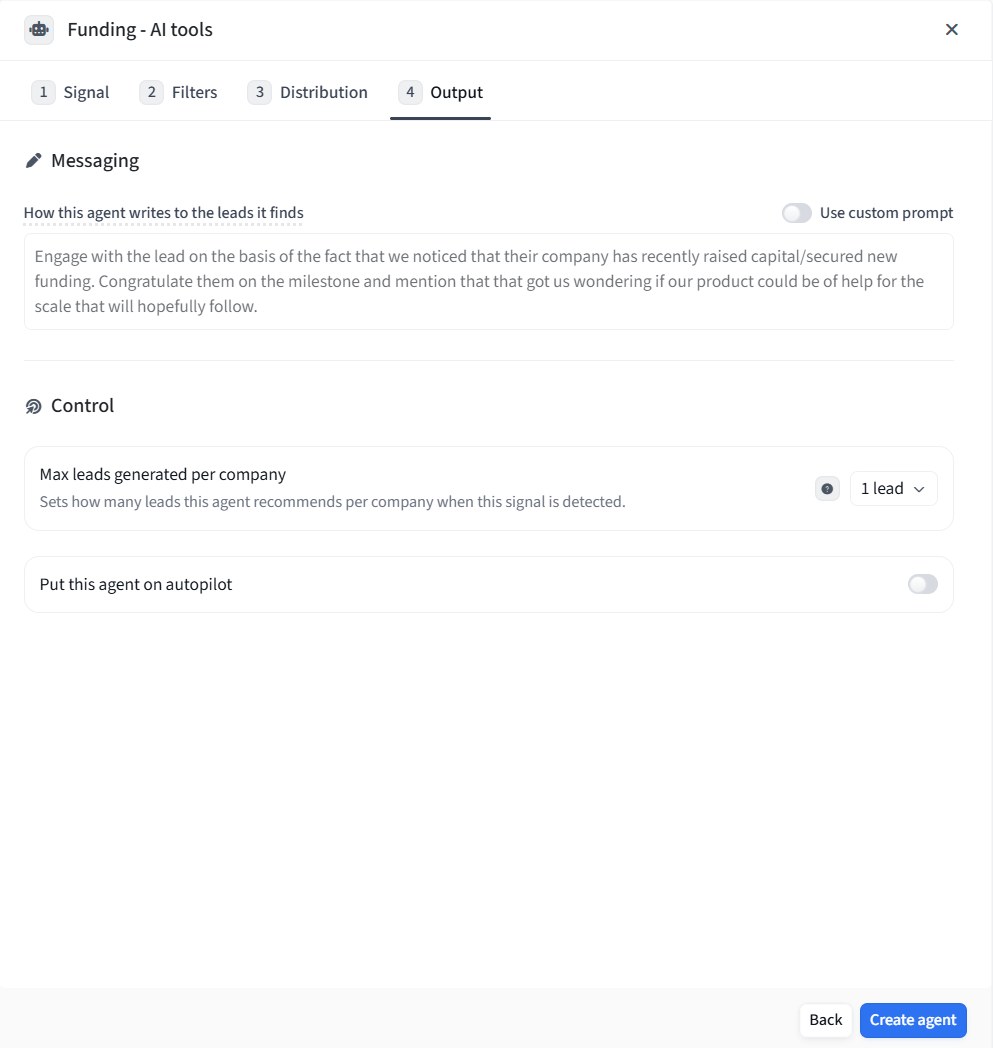
Read that default prompt before you accept it. "Congratulations on your funding" is the opening many founders will already be getting, so it's worth making your own.
Click Create agent, and it appears in the list, with a volume column that fills in over the following days. This is how ours looked when we created it:

Amplemarket's course also describes personas as preset filter combinations, such as seniority, title and company size, and says it builds some automatically. Our account showed none through MCP, so check yours under Settings → Personas before you rely on the feed.
3. Leave Autopilot off
Amplemarket's course says Autopilot "schedules outreach for Duo-recommended leads without waiting for manual review", and it can be set for specific signals. That has its place for lower-priority signals on a team with a proven message. For a new setup, we'd keep every signal on manual review until you've stopped editing that signal's drafts for several weeks. If a stale line like ours reached an Autopilot sequence, nobody would read it before it went out.
What the first week of leads showed
We created the Funding agent on the night of 4 November. By 7 November, the feed had 46 leads waiting for review, and none of them had been contacted:
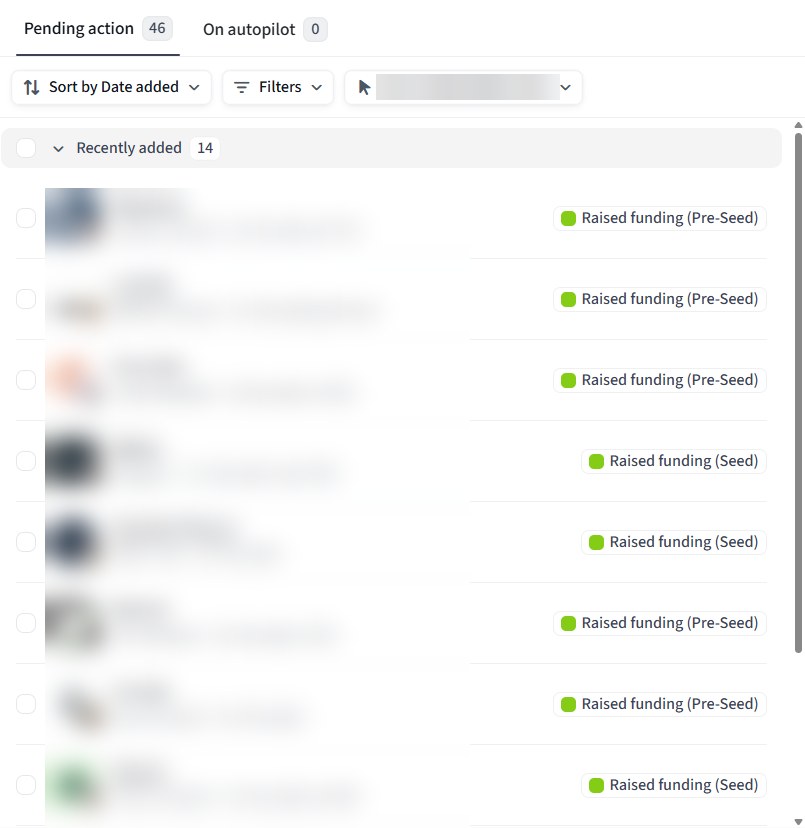
Each lead opens with the person, the company, the signal that triggered it and a link to its source, followed by a recommended sequence:
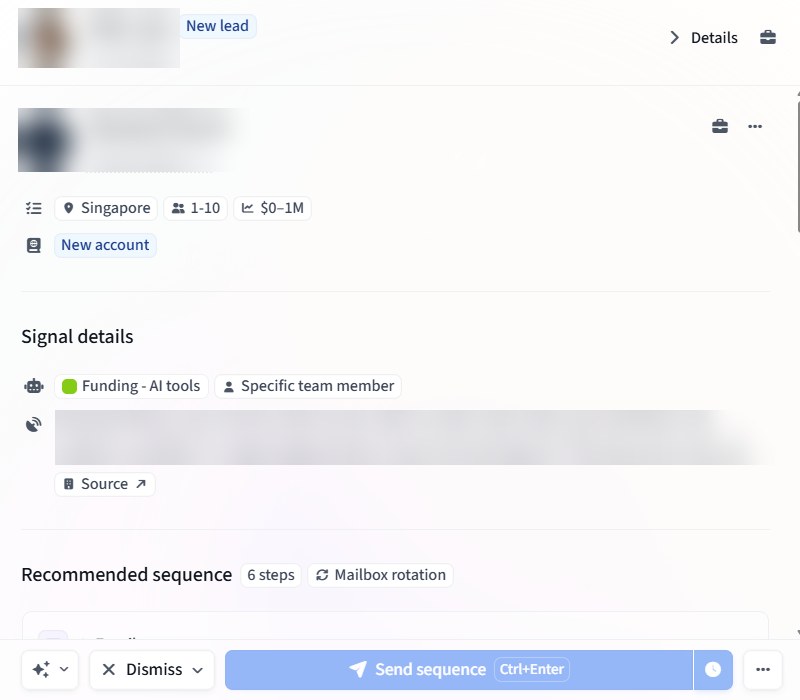
We read the first 10 recommendations in full:
| What we checked in the first 10 | Result |
|---|---|
| Triggered by a Pre-Seed or Seed round | 10 |
| At companies of 1-10 people | 9 |
| Drafted as 6 steps (3 emails, a LinkedIn connection request, a message and a post like) | 10 |
| Naming the actual size of the round in the first email | 7 |
| Plainly outside our market (lab robotics, water networks, insurance infrastructure) | 3 |
| Draft written under a different company name from the one shown on the lead | 2 |
| Repeating our out-of-date "before paying" promise | 3 |
The last row is the one that matters. The value propositions that Duo generated during setup were stale within hours, and three days later Duo was writing that promise into new sequences:
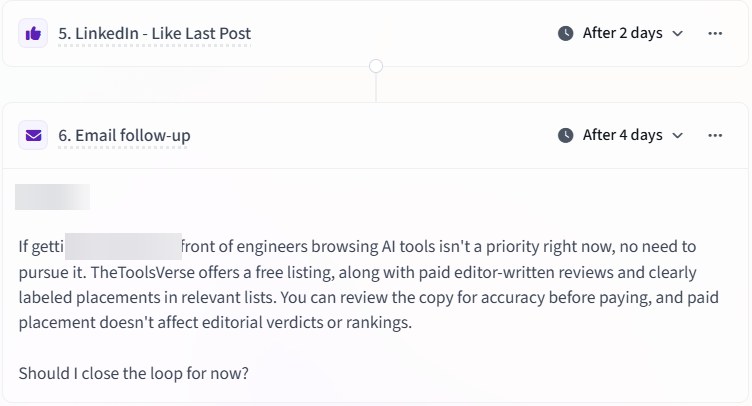
The rest of the drafts were good. They were specific to each company, and twice Duo wrote that our audience might not be the right fit, which is more honest than most cold email. But none of this would show up without someone reading. That's what the routine below is for: Monday is when that line would have been caught.
The weekly routine
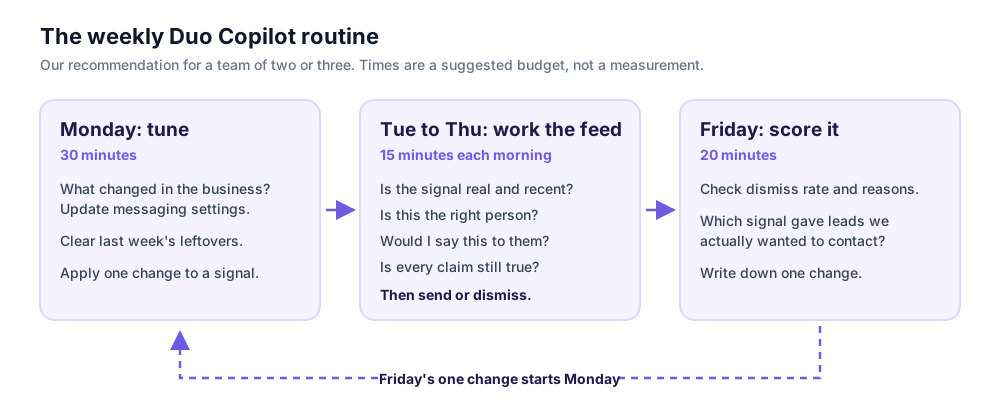
The times are our suggested budget for a team of two or three people, not something we measured. Use them as a limit. If the feed takes much longer than this, you probably have too many signals or filters that are too loose.
Monday: tune it (30 minutes)
- Ask what changed in the business last week. New pricing, a changed process, a lost integration, a customer you can no longer mention. Anything that changed goes into messaging settings today. This is the step that would have caught our problem.
- Clear last week's leftovers. Act on or dismiss anything still pending, so nothing drifts towards the 14-day limit unread.
- Apply Friday's decision. Tighten one signal's filters, or swap one signal out. Change one thing a week, or you won't know what worked.
Tuesday to Thursday: work the feed (15 minutes each morning)
Amplemarket's University calls the feed your "daily driver", with a prioritised list ready when you log in. Mornings suit it, because signals lose value as they age. For each lead, ask four questions:
- Is the signal real and recent? Open the detail. A loose keyword match looks exactly like a good one until you read it. We saw the same thing when we tested Amplemarket MCP: 41 companies matched our search, 8 of them were hiring, and only 2 of the 7 we read clearly fit.
- Is this the right person? The title has to fit the size of the company.
- Would I say this to them? Edit the draft or regenerate it. Amplemarket says Duo notices repeated edits and adjusts its messaging preferences.
- Is every claim still true? This takes seconds, and it's the check that protects your reputation.
Then send or dismiss. If you're unsure, decide anyway. A lead you keep skipping is telling you the signal is too broad.
How to dismiss properly
Dismissing is how you train Duo, and the reason you choose changes what happens. According to Amplemarket's dismiss guide:
| Reason | Use it when | What it does |
|---|---|---|
| Bad Company | The company will never fit | Removes it from your feed for at least 6 months and clears its other pending recommendations |
| Not the Right Person | Good company, wrong person | Removes that person from your feed for at least 6 months |
| Bad Signal | The trigger itself was wrong or irrelevant | Stops that signal from triggering more recommendations for you; the signal's setup doesn't change |
| Other Reason | None of the above | Removes this one recommendation, and Duo learns nothing |
Two things are worth knowing. There's no undo and no log of past dismisses, so reversing one means contacting support. And an admin's feedback on Bad Company or Not the Right Person can change the filters behind that signal or persona for other people using them. On a team of three, agree who gives that feedback. Use Other Reason rarely, because it teaches Duo nothing.
Friday: score it (20 minutes)
Amplemarket publishes a Duo Copilot performance monitor skill for its MCP. Even if you don't run it, its report is a sensible scorecard, and its default alerts give you starting thresholds:
| Check | Amplemarket's skill flags |
|---|---|
| Dismiss rate | Above 40%, or up 10 points on last week |
| One signal causing the dismisses | More than 40% of them |
| Weak signal | 50 or more leads with under a 1% interested rate over 30 days |
| Inactive rep | 3 or more business days without acting on a lead |
A small team may take weeks to reach 50 leads on a signal, so read those numbers alongside one plain question: of the leads this signal produced, how many did we actually want to contact? Write down one change for Monday, and stop there.
Running the review from Claude or ChatGPT
If you've connected Amplemarket MCP, you can do the morning read and the Friday review in a chat. The Duo tool takes filters for signal type, company, country and persona. We ran it on our account, and it correctly came back empty, so we haven't seen these prompts work on real leads:
Show me my pending Duo leads, grouped by signal type, with the signal
detail for each. Don't accept, schedule or dismiss anything.
What are the top dismiss reasons for Duo leads this week?
The second prompt comes from Amplemarket's own MCP guide. The first line of defence is the wording of your prompt, because the MCP can act as well as read. The description of its Duo action tool says that accepting or scheduling means "Amplemarket contacts the lead from the user's own mailbox and LinkedIn account, using AI-drafted copy the user may not have read". The same description tells the assistant to show the drafted stages and get explicit confirmation first. Keep your assistant's approval prompts switched on as well.
What we didn't test
We'd rather you know exactly where our evidence stops:
- We read 10 of the 46 recommendations in full, not all of them, so the numbers above describe a small sample from one agent.
- We sent nothing, so we have no open rates, reply rates or meetings to report. Amplemarket publishes its own figures, and they aren't ours.
- We didn't send, dismiss or edit any recommendation, so we haven't tested how Duo learns from those actions. Leads do arrive without a mailbox or LinkedIn connected: ours had neither.
- We didn't reconcile 20 and 25. The app's library showed 20 agents and the MCP tool's filter listed 25 signal types. We don't know why the numbers differ.
- The routine is a recommendation. We built it from Amplemarket's documentation and what we found on our account, and we haven't run it for a team over several weeks.
Our take
The appeal of Duo Copilot for a small team isn't the drafting. Plenty of tools can draft. It's that it answers the question that eats a rep's morning, "who should I contact today, and why?", and shows its reasoning before you commit to anything.
That only works if someone is actually reading. Our own account showed why. A careful, specific draft built from our real website was out of date within hours, through no fault of the software, because we changed the business and it had no way of knowing. An AI that writes well makes that kind of error harder to spot, since nothing about the sentence looks wrong.
So give it a small, fixed slot in the week. Thirty minutes to tell it what changed, fifteen minutes each morning to make the calls only you can make, and twenty minutes on Friday to learn something. If your team can keep that up, Duo has a real job to do. If it can't, the leads will go stale and it won't matter how good the drafts are.
Try the routine on your own signals
Set up three agents in Amplemarket Duo Copilot and run one week of this routine with manual review on. Start a free trial or book a demo with Amplemarket.
Get started with AmplemarketSources
| What | Source | Checked |
|---|---|---|
| All screenshots; all figures in the first table; the Duo tool's filters and action description | Our own reading of an Amplemarket account provided for partner content, in the app and through Amplemarket MCP in Claude Code | 2026-11-04 |
| What Duo Copilot does; feedback and control | Amplemarket Duo Copilot product page, amplemarket.com/duo | 2026-11-04 |
| Daily scans, daily feed, personas, Autopilot | Amplemarket University, Duo course | 2026-11-04 |
| Company signals and contact suggestions | Amplemarket, Custom API Signals integration page | 2026-11-04 |
| Account Insights and web search in Duo | Amplemarket product update, January 2026 | 2026-11-04 |
| The five settings and where they live; the 14-day limit; dismiss reasons | Amplemarket Knowledge Base articles linked above | 2026-11-04 |
| Scorecard thresholds | Amplemarket Skills, Duo Copilot performance monitor | 2026-11-04 |
| The dismiss-reasons prompt | Amplemarket MCP guide | 2026-10-31 |
Written by Sohail Akhtar. The routine and the three-signal rule are our own opinion. Amplemarket's product changes over time, so check its documentation for the current version.
Some links may be affiliate links. We may earn a small commission at no extra cost to you.
Related Articles
Explore more guides and reviews from our experts.
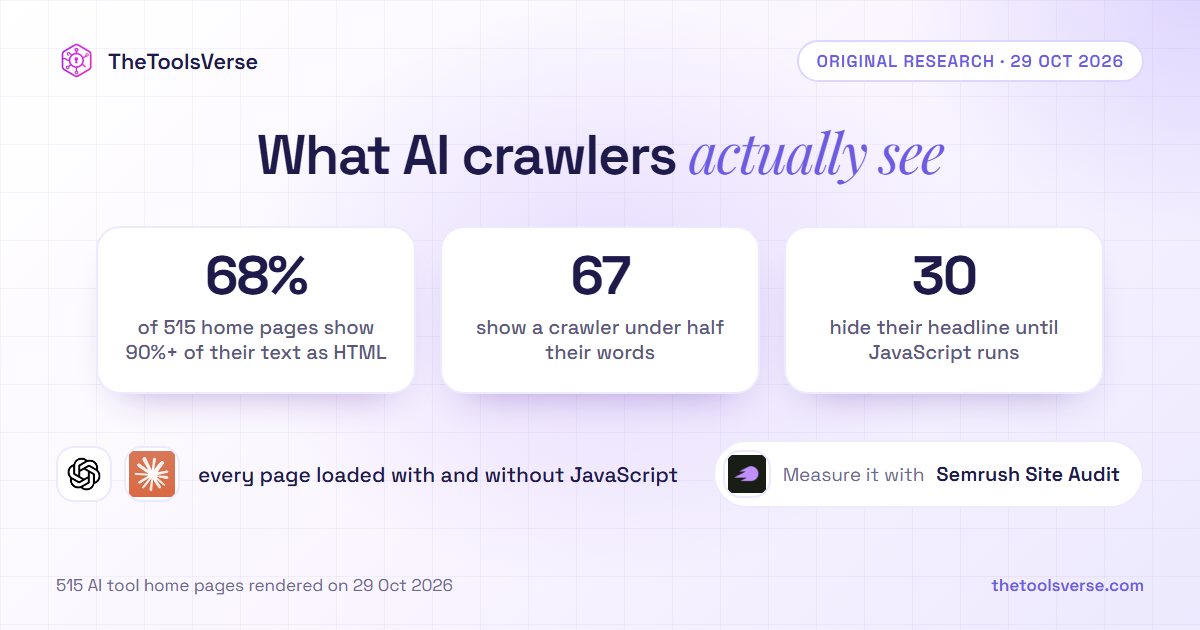
Most AI Crawlers Don't Run JavaScript. We Rendered 515 AI Tool Home Pages Both Ways: 67 Show a Crawler Less Than Half Their Words
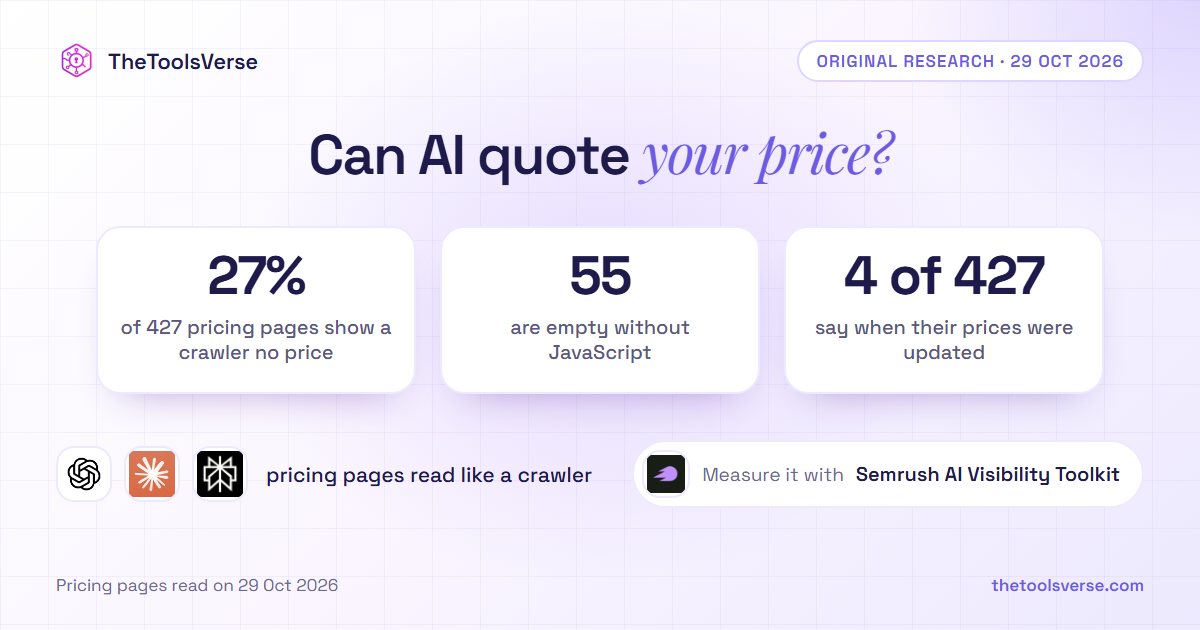
AI Answers Quote Your Price. We Read 427 AI Tool Pricing Pages Like a Crawler: 1 in 4 Shows No Price, and 4 Say When They Were Updated